
When hardware becomes part of the transaction.
Scanners, thermal printers and desktop bridges: how we connect physical devices to business workflows without confusing a device response with a completed operation.

Tools in context


The common problem
A scan is an observation. A print is an attempt. The business operation needs its own durable identity.
A commander scans a seal. A warehouse worker prints an invoice. A records officer feeds a document into a scanner. Each interaction looks like a small feature until a device disconnects between the physical action and the application's acknowledgement.
Across Falcon's Transito implementation, Hilton Kitchen and DocuBex, we met versions of the same engineering problem: software must translate device behavior into a meaningful business action while preserving what it actually knows. That requires more than wrapping a vendor SDK. It requires explicit boundaries between input, validation, persistence and physical output.
Grounded in the work
- Falcon / Transito
Native scanner and printer paths, manual entry, manifest review and thermal receipt composition.
- DocuBex
Electron scanner workspace with a .NET/NAPS2 helper; connection monitoring lives in the main process.
- Hilton Kitchen
Separate operational documents, deterministic invoice pagination and provisional offline records.
01 / 05
Start with the operation, then define the device contract.
In Falcon's Transito case study, the mobile application connects React Native and Expo screens to custom Kotlin and Java integrations. Scanner paths include Sunmi and MoreFun; printing includes Sunmi, MoreFun and Stylish paths. Some scanners emit native events. Others behave like a keyboard. The receiving screen also supports deliberate manual entry and review against the existing manifest.
Those input paths are not interchangeable evidence. A scan can identify a seal; a human review can record its condition. Neither establishes that the current operator is allowed to complete the current shipment. We keep the workflow's identity and validation above the device adapter. The adapter translates transport behavior; the application decides what the observation means.
A useful contract includes the device capability, capture method, workflow session and cancellation behavior. Avoid a universal success: true response: it collapses too many outcomes. A printer accepting bytes does not necessarily prove that a person received a legible receipt. A scanner discovering a barcode does not prove that the barcode belongs to this shipment.
This boundary also gives vendor changes a manageable scope. A new scanner should primarily change the adapter and its acceptance tests. It should not require a new interpretation of collection, custody or delivery in every screen.
02 / 05
A late device event must not change the next screen.
Suppose a user starts scanning a seal, leaves the receiving screen and opens another shipment. A late native callback must not populate the new shipment's field. Listener cleanup helps, but cancellation and callback delivery can race. The workflow therefore needs a session identity that can be checked when input arrives.
The following is an illustrative TypeScript contract, not copied Transito source. The adapter must attach the session identifier when capture starts; tagging a late event with whichever screen happens to be current would defeat the guard.
type ScanObservation = {
  sessionId: string;
  value: string;
  method: "native" | "keyboard" | "manual";
};

function acceptObservation(
  observation: ScanObservation,
  active: { sessionId: string; shipmentId: string },
) {
  if (observation.sessionId !== active.sessionId) {
    return { kind: "ignored", reason: "stale-session" } as const;
  }
  const seal = observation.value.trim();
  if (!/^[A-Za-z0-9-]{1,80}$/.test(seal)) {
    return { kind: "invalid" } as const;
  }
  return {
    kind: "candidate",
    shipmentId: active.shipmentId,
    seal,
    method: observation.method,
  } as const;
}
The accepted value remains a candidate. Server-side authorization, manifest membership, current shipment state and duplicate handling still belong to the eventual command. The sample grammar is intentionally illustrative; a real installation must use its actual identifier rules.
Lifecycle ownership matters beyond subscriptions. Android's lifecycle documentation explains that screens move through states as users leave and return, and their process can be destroyed. Long-lived work cannot rely on a screen remaining visible.
DocuBex applies a related separation on Windows: its connection heartbeat moved into Electron's main process. Renderer refreshes concern presentation; transfer state concerns durable work. A minimized window should not silently redefine whether the companion is connected.
03 / 05
Commit the business action; track printing separately.
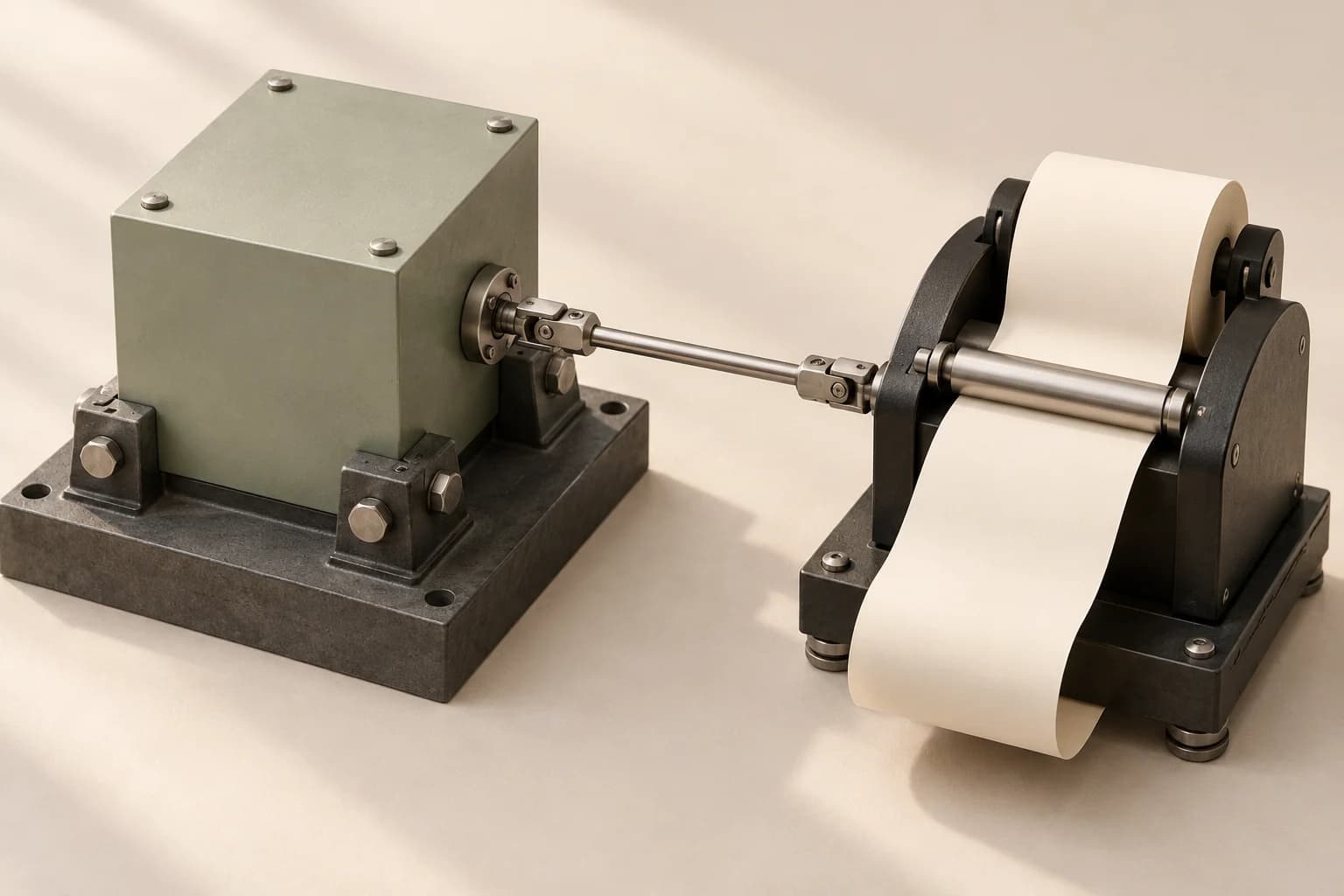
One committed handover. Independent output.
The anchored block represents the committed handover. The paper mechanism has its own lifecycle: a printer failure can require another output attempt without creating another business transaction.
- Anchored block
- The durable handover record remains committed.
- Metal linkage
- A print job refers back to that existing record.
- Paper mechanism
- Output attempts can fail, retry or need reconciliation.
A completed handover and a printed receipt have different failure modes. The database can accept the handover while the printer is disconnected. Repeating the handover to obtain another receipt could repeat inventory or custody effects.
The design we advocate assigns the business operation one stable identity and gives physical output its own attempt history. Reprint from the saved receipt data. Preserve branch codes, signatures, currency and the original operation reference. If the adapter cannot distinguish an accepted job from completed physical output, show that uncertainty honestly.
Falcon's case study records practical receipt work around Arabic/Latin content, branch identifiers, signatures and thermal branding. Hilton demonstrates the same principle on a different medium: its A4 invoices have explicit pagination rules, with up to fifteen distinct item lines per page and a separate machine-unit appendix. Screen layout and paper geometry are separate responsibilities.
An acknowledgement may justify “sent to printer.” It does not automatically justify “printed successfully.” The distinction determines what the operator should try next.
Explore the failure boundary
One handover. Independent print attempts.
A simplified teaching model. Choose a failure point to see which action is safe to repeat.
Handover
Committed
The shipment transition has a stable operation ID.
Print attempt
Not sent
The adapter reports the device unavailable.
Recovery
Retry print
Use the saved receipt. Do not repeat the handover.
Only the physical-output attempt needs another try.
04 / 05
The desktop bridge is also a trust boundary.
DocuBex's scanner companion connects hardware, local files, page preparation and uploads. Electron owns the desktop experience; a .NET/NAPS2 helper handles scanner integration. Users can review, reorder and prepare pages before sending them onward. Acquisition and filing remain separate stages.
A narrow bridge should expose specific operations such as discovering devices or starting an approved capture. It should not let arbitrary renderer content choose executable paths, invoke shell commands or read any local file. Pairing an application with a server also needs a clearly scoped destination and credentials that do not leak into renderer logs.
These are implementation review criteria, not a claim that every safeguard is proven by a screenshot. Electron's security guidance recommends context isolation, process sandboxing and validating the sender of IPC messages. Treat a renderer as a less privileged participant and validate both the request shape and its origin before invoking native capabilities.
The same idea applies to scan payloads. Barcode contents are untrusted strings. They should never become executable expressions, navigation targets or file paths merely because a physical device produced them. Keep the exact original value when auditability requires it, then validate a normalized representation for the intended business field.
05 / 05
Verify the failure boundary on the actual installation.
A useful acceptance plan crosses the whole path: physical input, adapter event, active workflow, server decision, persisted result and visible feedback. Unit tests cover normalization and state transitions. Adapter tests cover timeouts and event ordering. The actual device remains necessary for print geometry, permissions, driver behavior and interruption recovery.
| Failure to inject | Invariant to inspect | Useful evidence |
|---|---|---|
| Scan arrives after navigation | It cannot edit another shipment | Session ID and unchanged destination record |
| Device reconnects and repeats input | One observation cannot silently repeat a business transition | Stable command identity and resulting records |
| Server accepts; printer disconnects | Business state stays committed | Saved operation plus independent print attempt |
| Desktop window is minimized | Transfer/connection ownership stays defined | Main-process lifecycle and persisted transfer state |
| Arabic receipt has a long branch name | Identity remains legible on paper | Actual output at the installed width |
Record the model, firmware or driver, operating system, application build and media settings with the result. A passing renderer demo establishes layout under its fixture conditions; it does not certify a scanner.
Our published sources deliberately retain these limits. Falcon has implemented device integrations. DocuBex's retained scanner capture uses fixture device data. Hilton's packaged runtime and hardware acceptance have separate gates in its recorded handoff. Bookalto and Salony's hardware artwork is future-facing concept work, so neither is evidence of an installed reader.
The reusable lesson is concrete: give device activity a precise meaning, keep it attached to the correct workflow, and preserve enough state to recover without repeating the business event. That is what turns a hardware feature into a dependable operational system.
Carry this into your next system
Three decisions to keep.
- Keep transport adapters below workflow validation and authorization.
- Give business commands and print attempts separate identities.
- Reject stale device events and verify physical output on the installation.
Trace the reasoning
References & further reading.
Project claims link to the published case studies. External references are primary technical documentation, reviewed on 18 October 2026. Code and interactive scenarios are teaching examples with the limits described alongside them.
- Falcon / Transito engineering case study
Implemented Android adapters, manifest review and receipt composition; device acceptance remains installation-specific.
- DocuBex engineering case study
Scanner Bridge architecture and main-process heartbeat; retained demo evidence is clearly scoped.
- Hilton Kitchen engineering case study
Operational printing, offline records and deterministic pagination.
- Android Developers — The activity lifecycle
Primary reference for lifecycle transitions and resource ownership.
- Electron — Security
Primary guidance for context isolation, sandboxing and IPC validation.
Case-study evidence retains its original scope and date. This article does not represent a new test run against the underlying products, a hardware certification or a production performance benchmark.