

Hilton Kitchen
Client app / An engineering case studyFrom counterto complete.
Point of sale, production, inventory and payments. One connected system, built around the way Hilton Kitchen works.
Inside the story20 min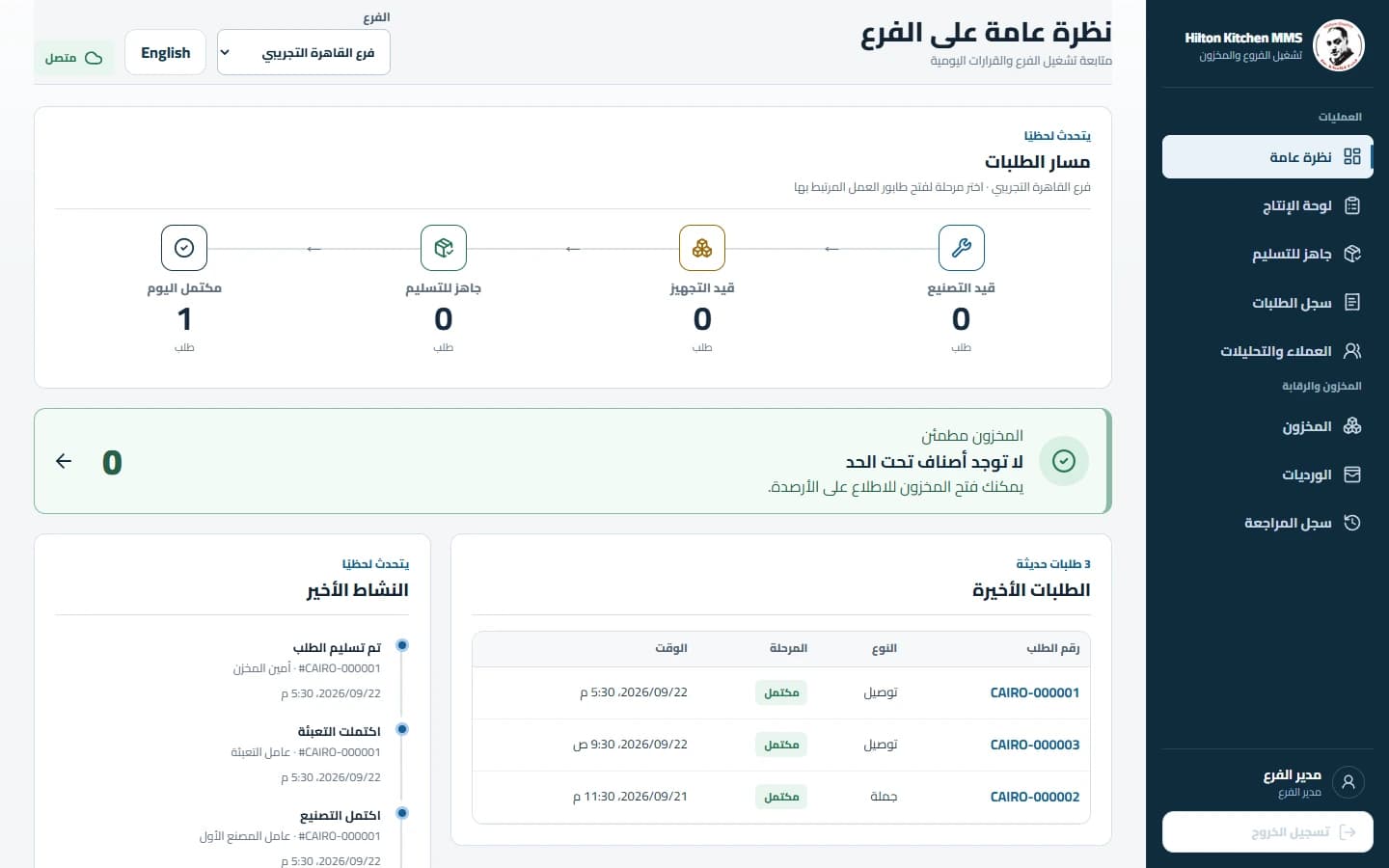
- Relationship
- Client app
- Our role
- Product design & engineering
- Surfaces
- Web + Windows
- Working language
- Arabic first / English supported
A custom Arabic POS, production, inventory, and employee operations system by the Softworks engineering team.
An order is a promise that several people must fulfill. The cashier needs to know whether a sale can complete. Production needs to know what to make. Packaging needs to know what is actually ready. Warehouse staff need an accurate stock position. Management needs to understand the same operation without reconstructing it from separate screens.
For Hilton Kitchen, we built the software around those connections. The resulting system brings together immediate retail sales, delivery and wholesale production, serialized equipment sales, customer payments, warehouse activity, operational documents, and a Windows employee application. Arabic is the primary working language, and the interface is designed for the touch terminals people use to get the work done.
The engineering challenge was to make every action mean the same thing across the interface, database, printed document, and next employee's workspace. This case study explains the decisions behind that result, the difficult scenarios they address, and the implementation evidence that supports the story.
Built around the way work moves.
Sold. Handed over. Paid. Three different facts.
Project at a glance
| Dimension | What we built |
|---|---|
| Client product | Hilton Kitchen MMS |
| Engineering team | Softworks |
| Product category | Custom business operations software |
| Primary market and language | Egyptian operating context; Arabic RTL, with English LTR support |
| Operational surfaces | Cashier, Sales, Factory, Packaging, Warehouse, Manager, Admin |
| Delivery surfaces | Web application and an Electron Windows employee application |
| Order types | POS, Machine, Delivery, Wholesale |
| Core integrations inside the product | Order lifecycle, inventory movements, customer balances, payment records, operational printing, real-time updates |
| Evidence basis | Repository implementation, tests, commit history, dated verification reports, and existing screenshots |
The public narrative describes the implemented source as reviewed on 18 October 2026. Release evidence and images are dated separately. The newest warehouse refinements were locally verified in September; this case study does not imply that every working-tree change is deployed or included in an installed Windows package.
The operational problem
A single business can sell a finished product immediately, manufacture a bulk order, sell an individually identified machine, and collect the remaining balance weeks later. All four activities may look like an order on a dashboard. Operationally, they have different consequences.
Sending a finished retail sale into production creates work that should not exist. Treating a delivery order as an immediate stock sale can deduct inventory before the goods are ready. Treating a partially paid machine as unfinished confuses money collection with physical fulfillment. Treating two identical machine models as interchangeable loses the history of the actual unit that was sold.
These are the problems the implementation had to represent clearly. They are engineering scenarios derived from the workflow and code, rather than claims that a named employee or customer experienced a particular incident.
Our starting point was the supplied Arabic operating workflow. We then followed the approved scope amendments recorded in the repository: direct POS sales, a dedicated Machines area, customer account settlement, returns, and broader offline employee operations. The product evolved through these decisions while retaining explicit paths for each business action.
What customization meant here
Customization was more than adding a logo or translating menu labels. It changed when inventory moves, which orders enter manufacturing, how a physical machine is selected, what a packaging discrepancy means, how a later payment attaches to a sale, and what the operator sees after an uncertain network response.
It also shaped the workspace itself. Cashier controls emphasize product selection and checkout. Factory and packaging views emphasize the next operational action. Warehouse staff see product search, current stock, and an editor in one working area. Managers can follow branch activity from either a touch screen or a denser desktop view.
Same counter. Different consequences.
Follow an order
- 01
A sale at the counter
Finished products, or a specifically selected machine unit.
- 02
One transaction
Recheck stock, record the sale, deduct inventory and queue its document.
- 03
Completed from stock
No manufacturing task is created for goods already available.
Sales can record advances and installments. Cashier checkout requires full tender.
The workflow we customized
Immediate sales: finished stock to completed order
POS orders sell standard products already available in finished inventory. Machine orders sell equipment through a separate product area. Both paths verify available stock and complete the sale in the same database transaction that records the inventory deduction and document job.
Neither path enters the manufacturing queue. A cashier can finish a sale without creating a manufacturing task for a product that is already on the shelf. The machine path additionally records the physical units selected for the sale.
Production orders: a shared queue with explicit handoffs
Delivery and wholesale orders begin in manufacturing. Both factory workspaces see the same branch queue. Completing manufacturing moves the order to packaging. Packaging reconciles what is being prepared, completes its work, and makes the order ready for collection or dispatch.
The implementation records positive manufactured output when packaging completes. A later named handoff records the inventory exit and completes the order. These are separate events because “the goods are ready” and “the goods have left” are different operational facts.
Text alternative: retail and machine sales complete directly from inventory. Delivery and wholesale orders move through manufacturing, packaging, readiness, and final handoff. Payment progress is recorded separately from both paths.
Payment collection runs alongside fulfillment
A Sales employee can record an advance, a partial payment, or a later installment against an eligible order. The order can be physically complete while money remains due. Cashier checkout continues to require full tender.
The system therefore keeps fulfillment progress and financial progress distinct. Users can see what happened to the goods and what happened to the balance without forcing one state to impersonate the other.
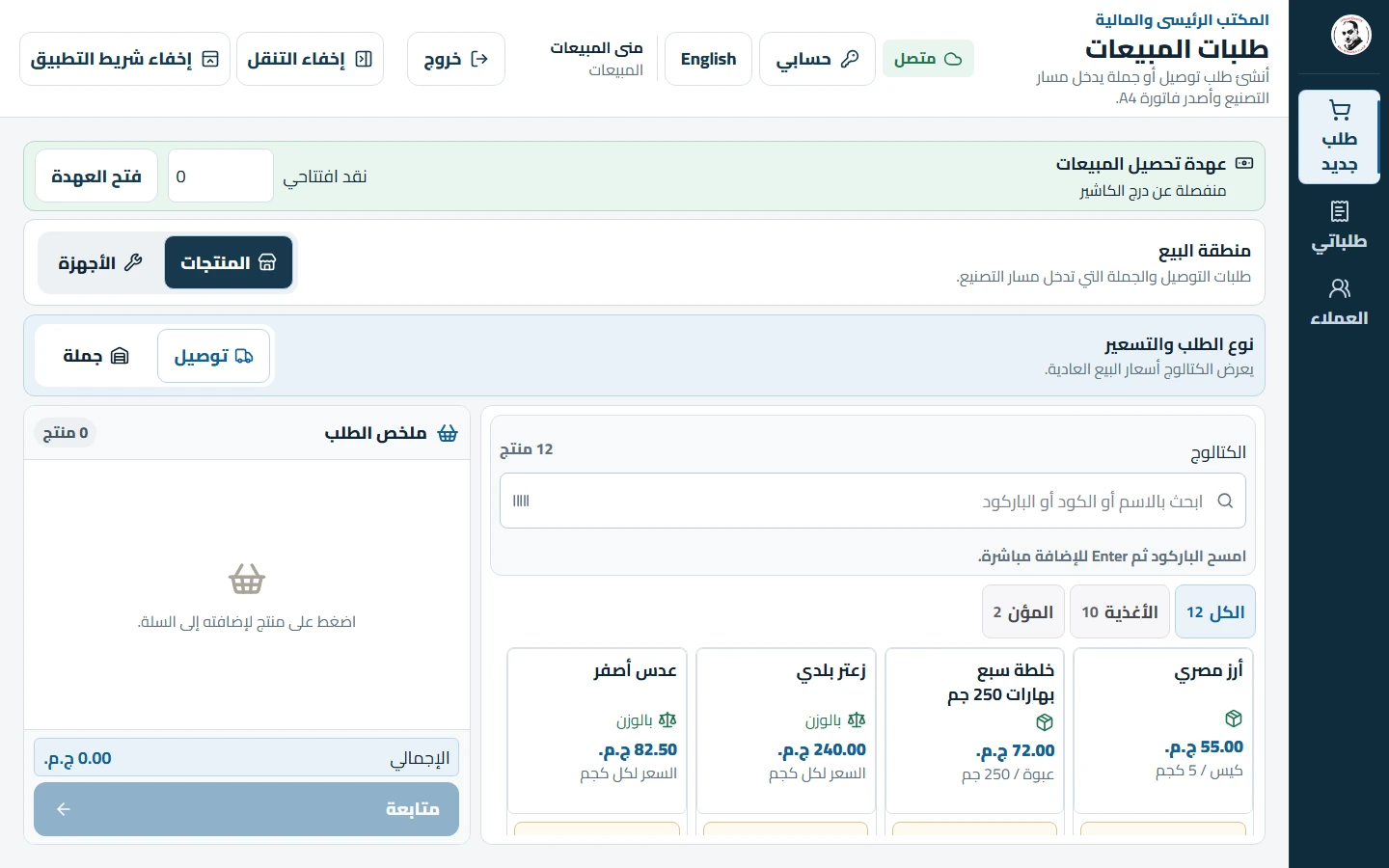
A captured Sales workspace. The case-study explanation covers the implemented workflow; the screenshot is a visual reference, rather than evidence that every financial state is open on screen.
Inspect the order-flow diagram source
flowchart LR
    A[POS: standard finished stock] --> B[Verify stock and record sale]
    M[Machines: selected physical units] --> B
    B --> C[Completed + inventory out + document]
    D[Delivery / Wholesale] --> E[Manufacturing]
    E --> F[Packaging and reconciliation]
    F --> G[Ready + manufactured inventory in]
    G --> H[Named handoff]
H --> I[Completed + inventory out]A sale has to hold together.
Fastify services validate named actions with Zod. Stock, orders, payments and document jobs commit together where the operation requires them.
Named action → database transaction → post-commit notification → snapshot refresh
The architecture and technology choices
We used a TypeScript workspace with a Next.js frontend, a Fastify backend, and PostgreSQL managed through Prisma. Socket.IO connects operational views to committed changes. Electron packages the employee experience for Windows, with SQLite supporting durable local work.
The architecture keeps business rules in backend domain services. Interfaces request named actions, such as completing packaging or handing over an order. The service determines the transaction that must happen, and the interface presents the confirmed outcome.
| Layer | Repository version at review | Purpose in this system |
|---|---|---|
| Runtime and workspace | Node.js 24; pnpm 11.21.0 | A consistent JavaScript runtime and pinned workspace tooling |
| Web application | Next.js 16.3.1; React 19.2.8 | Shared web and bundled Windows renderer |
| Language | TypeScript 6.0.3 | Explicit contracts across the application |
| Interface foundation | Tailwind CSS 4.3.3; Radix UI 1.6.7; open-code shadcn components | Reusable interaction primitives and application-specific presentation |
| API | Fastify 5.12.0; Zod 4.3.3 | Named application operations and validated request/response shapes |
| Database | PostgreSQL 16; Prisma 7.9.1 | Relational records, migrations, decimal fields, and transactions |
| Arithmetic | decimal.js 10.6.0 | Decimal-safe money and measured quantities |
| Real-time updates | Socket.IO 4.8.3 | Post-commit change notifications and snapshot refresh |
| Windows application | Electron 44.2.0; SQLite | Bundled employee UI and durable offline work |
| Verification | Vitest 4.1.0; Playwright 1.62.1; Testing Library | Domain, component, integration, and browser checks |
These are the versions pinned in the reviewed repository, not a recommendation to substitute the latest release of each dependency.
A transaction is the unit of business completion
For an immediate sale, creating the order alone would be insufficient. Its items, inventory movements, initial state, financial records where applicable, and document job must agree. If stock is unavailable, the operation must not leave behind a completed order with missing inventory entries.
We treated that set of writes as one unit. This makes the transaction boundary a direct expression of the business promise: either the sale is recorded coherently, or it is rejected without a partial sale.
Real-time messages announce committed facts
Socket.IO notifications are emitted after a transaction commits. A screen receiving an event refreshes the relevant REST snapshot. Reconnecting screens also refetch, because a device may have missed messages while disconnected. Periodic reconciliation continues while connected, at approximately five-second intervals in the current implementation, to recover missed notifications across hosted instances.
This keeps the database as the authoritative state and makes real-time delivery useful without making every browser maintain its own independent interpretation of the business. The same principle serves a factory queue, a manager overview, and a ready-order list.
The difficult scenarios
The examples below are illustrative reconstructions of conditions the implementation handles. Quantities and monetary amounts are examples, not customer records or measured production incidents.
Two cashiers try to sell the last available item
Scenario. Two terminals both display one unit in stock. Each operator adds it to a basket before the other finishes checkout. A check performed only when the product was displayed is already out of date.
Our implementation. Immediate checkout locks and rechecks the relevant inventory within the sale transaction. Stock validation and deduction share that boundary. A competing sale cannot successfully consume inventory that has already been committed elsewhere.
Why it matters. The interface can remain responsive while the final business decision uses current database state. A shortage rejects the whole sale instead of leaving an order that cannot be fulfilled. Tests exercise shortages, rollback, and replay rather than merely checking that a success screen renders.
The sale succeeds, but its response never reaches the terminal
Scenario. The server records an order. The network disconnects before the response arrives. The operator cannot tell whether pressing confirm again will create another sale.
Our implementation. Each mutation carries a stable action identifier. The system stores its result and returns that result when the same operation is replayed. An uncertain response keeps the original operation identity; it does not create a new business intention.
Why it matters. Preventing double taps in the UI improves usability, but replay handling protects the operation beyond a single click handler. It covers retries, reconnects, and delayed responses. The operator can recover without multiplying orders or stock movements.
A machine is sold today and paid off later
Scenario. A Sales employee sells a machine with an advance payment and an agreed outstanding balance. The customer receives the unit now. The remaining money arrives later.
Our implementation. Machine fulfillment completes and deducts the selected units immediately. The financial ledger tracks the advance, later installments, and remaining amount independently. Payment plans and collection records represent the ongoing financial work.
Why it matters. A physically completed sale does not become a manufacturing job simply because it has a balance due. Later installments update the financial position without repeating stock deduction. The system records cash and supported transfer evidence; it does not claim to operate a payment gateway.
Two units share a model name, but only one is being returned
Scenario. A customer buys a machine and later returns a specific physical unit. A product-level quantity alone cannot establish which serial was sold or what happened to that unit afterward.
Our implementation. The equipment workflow tracks physical machine units alongside catalog products. A completed-sale return selects the relevant sold quantities or serials and records stock disposition. It adds a return transaction instead of overwriting the original sale.
Why it matters. Product identity and unit identity remain distinct. Returning an item to available stock is an explicit decision, not an automatic assumption. Financial disposition is recorded alongside the return while preserving the original sales history.
// Illustrative transaction model, not production source.
async function completeSale(command: SaleCommand) {
  const result = await database.transaction(async (tx) => {
    const previous = await tx.actions.claimOrRead(command.actionId);
    if (previous.completed) return previous.result;

    const stock = await tx.inventory.lockAndRead(command.items);
    assertAvailable(stock, command.items);

    const order = await tx.orders.createCompleted(command);
    await tx.inventory.recordOut(order);
    await tx.documents.enqueue(order);
    await tx.actions.complete(command.actionId, order);
    return order;
  });

  // Other workspaces refresh only after the commit succeeds.
  notifyCommittedChange(result.id);
  return result;
}
Simplified explanatory code, not production source. claimOrRead represents an atomic action claim, not a separate check followed by a write.
Every quantity has a history.
Packaging receives a result that needs reconciliation
Scenario. The order describes what should be delivered, while the packaging operator must confirm what is actually ready. Treating “complete” as a generic status edit would hide that distinction.
Our implementation. Packaging confirms that the packaged quantity exactly matches each line's remaining ordered quantity. A mismatch is rejected; invalidated packaging must be confirmed again before progression. Manufactured output is recorded at packaging completion. Handoff remains a separate action with its own inventory exit.
Why it matters. The inventory ledger tells a coherent story about goods becoming available and later leaving. The workflow preserves the distinction between preparing a package and transferring possession. The physical-machine and packaging work is visible in the August implementation history.
A quantity is correct in Arabic, but the browser rejects it
Scenario. A warehouse worker types ١٢٫٥. A native numeric input can reject the characters before application code has a chance to normalize them. During editing, moving the caret or composing text can introduce additional problems.
Our implementation. The shared quantity control uses a text input with a decimal keyboard hint. It recognizes Arabic-Indic and Persian numerals and supported decimal separators, then converts complete input to the canonical decimal representation. Incomplete edits remain editable and cannot be submitted as completed quantities.
Why it matters. Localization reaches the data-entry boundary rather than stopping at translated labels. The same control handles typing, precision, validation, and caret behavior, while backend quantities retain their strict representation. The latest warehouse refinements include regression checks for these details.
Stock changes after a correction form opens
Scenario. A worker sees a balance of ten and prepares an exact correction. Before saving, another legitimate operation changes the balance. Blindly writing the new number would conceal the intervening movement.
Our implementation. Exact-balance correction is separate from ordinary stock-in and stock-out. It includes the expected existing quantity. If that expectation is stale, the action conflicts and the operator refreshes. The system records the resulting adjustment as a movement; an unchanged balance does not create a meaningless movement.
Why it matters. Corrections express a deliberate adjustment while preserving the history of how the balance changed. Serialized machines remain outside generic exact-count correction, because their available quantity must correspond to actual physical units.
Keep the work. Resolve the uncertainty.
Windows / A durable outbox
- Capture customerSaved locally
- Create orderWaiting for customer
- Later installmentWaiting for order
Commands are durable in SQLite. Documents stay provisional; closing the screen does not erase the work.
An illustrative model. Durable offline business commands belong to the Windows app; the browser caches its shell and static assets.A terminal reconnects with dependent work still queued
Scenario. Offline work may include a newly captured customer, an order using that customer, and a later payment or transition associated with the order. Replaying these in an arbitrary order creates avoidable failures.
Our implementation. The Windows application stores durable commands and their dependencies. Its main-process coordinator handles replay independently of the currently visible React screen. A command waits for required dependencies, and an unrelated entity can continue when another item needs resolution.
Why it matters. Offline work is a sequence of business intentions with explicit outcomes. It survives a screen change and does not depend on the employee leaving the same page open. Provisional documents remain visibly provisional until the server confirms the underlying operation.
Two disconnected terminals both believe a machine is available
Scenario. Separate offline terminals start with a snapshot containing the same physical unit. Neither can know what the other has captured without a shared connection.
Our implementation. Each terminal uses its local snapshot and cached machine-unit availability; POS quantity projection also accounts for that terminal's pending sales. After reconnecting, the server revalidates the actual stock and serial availability. A conflicting capture enters an explicit resolution flow rather than being silently treated as a completed sale.
Why it matters. Offline capability has an honest consistency boundary. Local durability preserves work, while central validation decides whether it can be committed. The product does not promise global offline reservation between disconnected devices.
An accepted sale disappears from the local projection too early
Scenario. A terminal receives an acknowledgement for a queued POS sale but still holds an older inventory snapshot. If it stops subtracting that sale immediately, the old snapshot can make the sold stock appear available again.
Our implementation. Inventory snapshots and accepted operations carry an inventory revision. The POS quantity projection keeps accounting for the sale until a coherent snapshot proves that it includes the committed change. It does not depend on comparing device clocks. Machine availability uses cached physical units rather than this POS quantity-projection loop.
Why it matters. Synchronization reconciles a known business revision rather than hoping that timestamps establish the correct order. This is a small implementation detail with a direct effect on the balance the operator sees.
An older Windows queue meets a newer API contract
Scenario. Work captured by an earlier desktop version still needs to synchronize after the application evolves. A warehouse command containing a field named direction cannot simply be treated as though it already uses the executor's movementType shape.
Our implementation. The current Windows 0.1.5 working tree includes a compatibility correction for queued warehouse movements, plus a Sales installment replay correction. The release report distinguishes newly captured operations from older queued envelopes and records route-level testing.
Why it matters. Compatibility must include work that already exists on terminals. Rebuilding the UI alone does not fix historical queued commands. The specific fixes are documented as working-tree and build-report evidence, not attributed to a commit that predates them.
The interface does not end at the screen.
Every page has a rule
31 lines = 15 + 15 + 1. Up to 15 item lines per page, with repeating identity headers.
Illustrative pagination, not a real invoice. Machine-unit appendices have their own rule: eight units per page.An invoice grows beyond two pages
Scenario. A professional A4 invoice contains 31 distinct lines. A browser layout that happens to look correct with six lines may split rows, lose headings, or place totals awkwardly when the document grows.
Our implementation. Sales and machine invoice rows are chunked into pages of up to 15 distinct lines. Identity headers repeat on continuation pages. Thirty-one lines therefore occupy three item pages: 15, 15, and 1. Machine-unit detail has its own appendix pagination of eight units per page.
Why it matters. Pagination becomes a deterministic document rule. It is tested at boundaries and beyond two pages, rather than left to accidental browser page breaks. The current order schema accepts up to 100 lines for the larger order paths and 20 for POS; pagination does not imply unlimited accepted input.
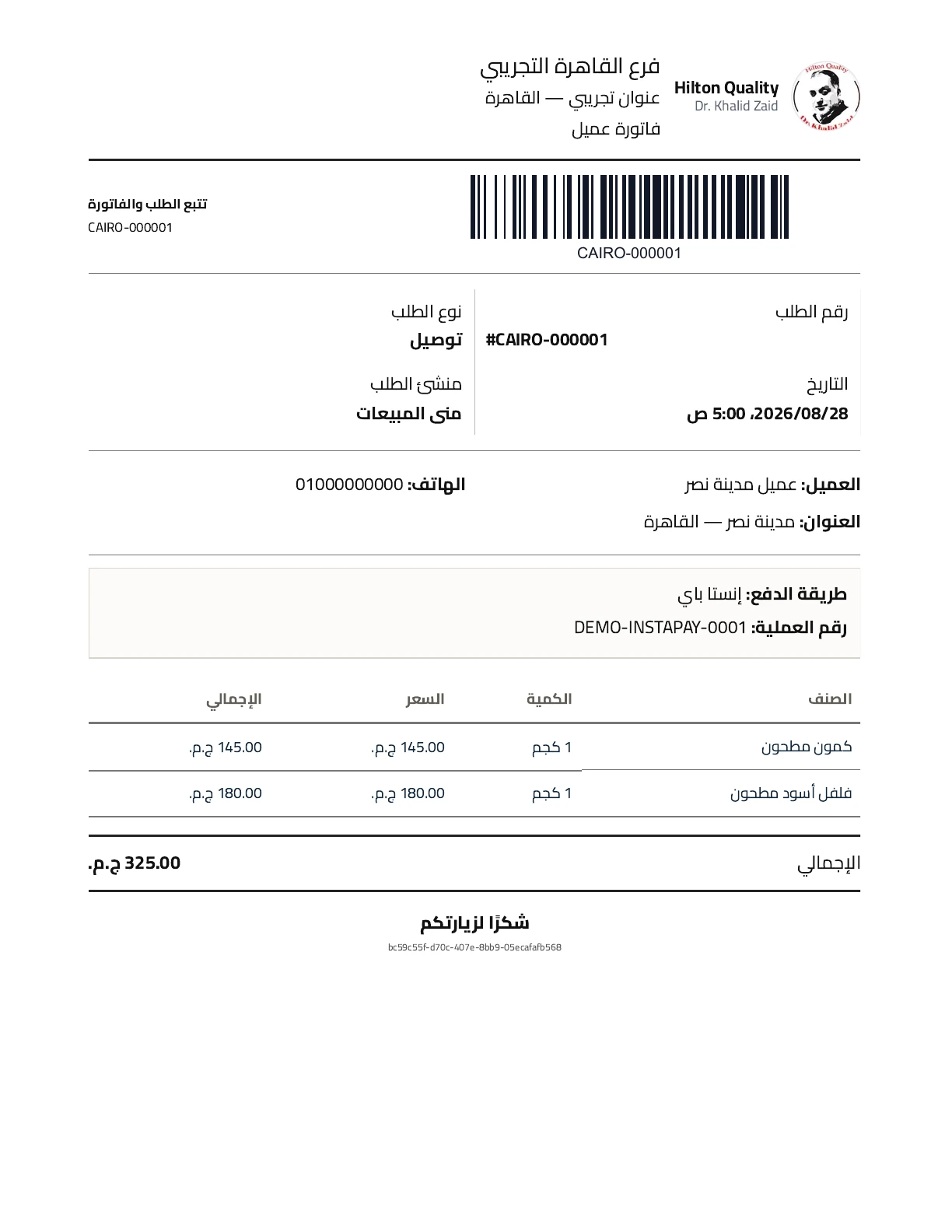
A historical document preview, included to illustrate the branded print surface. Pagination behavior is supported by implementation and tests, not inferred from this single image.
The interface, documents, and delivery process
Designing for a working hand, not just a mouse
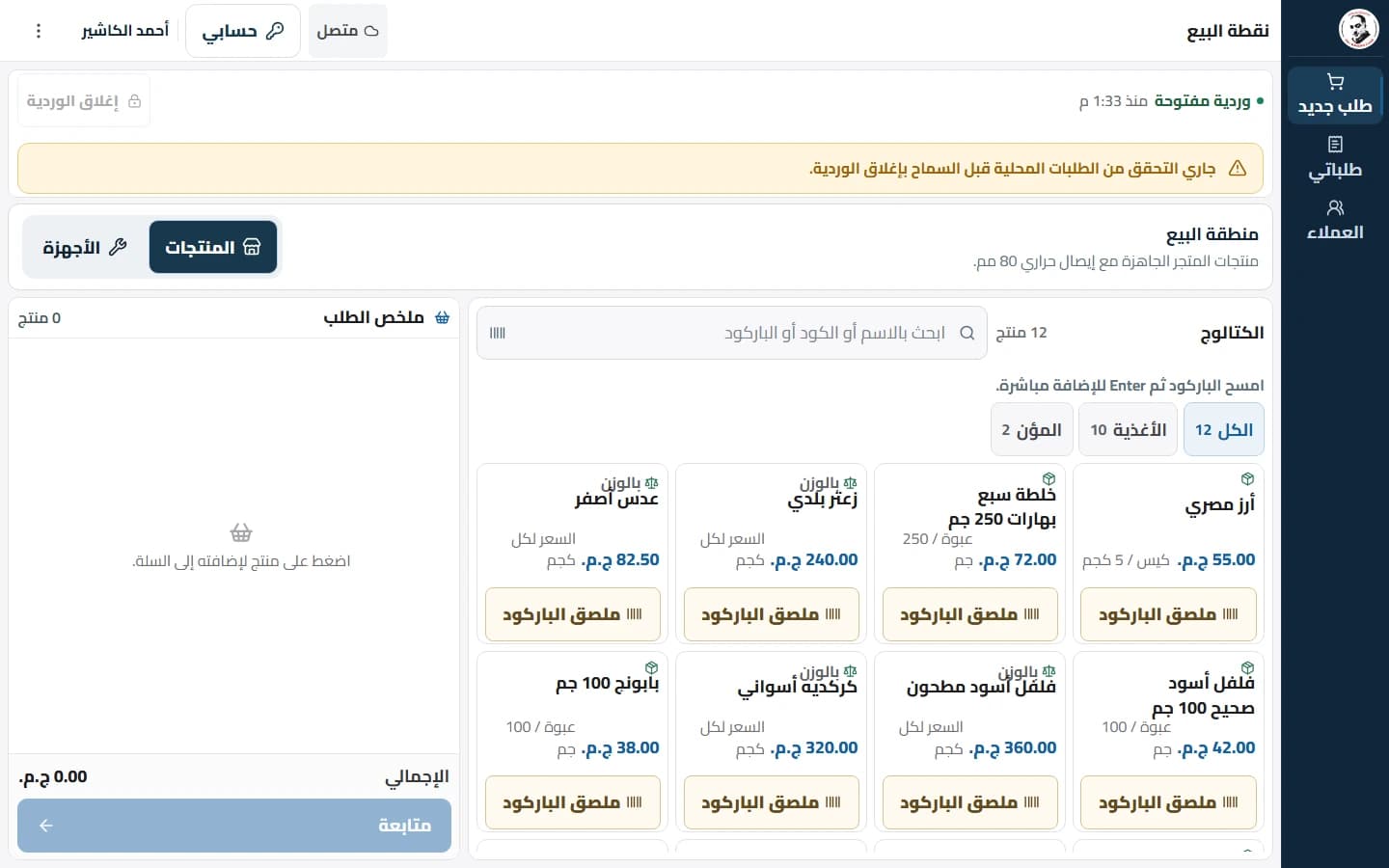
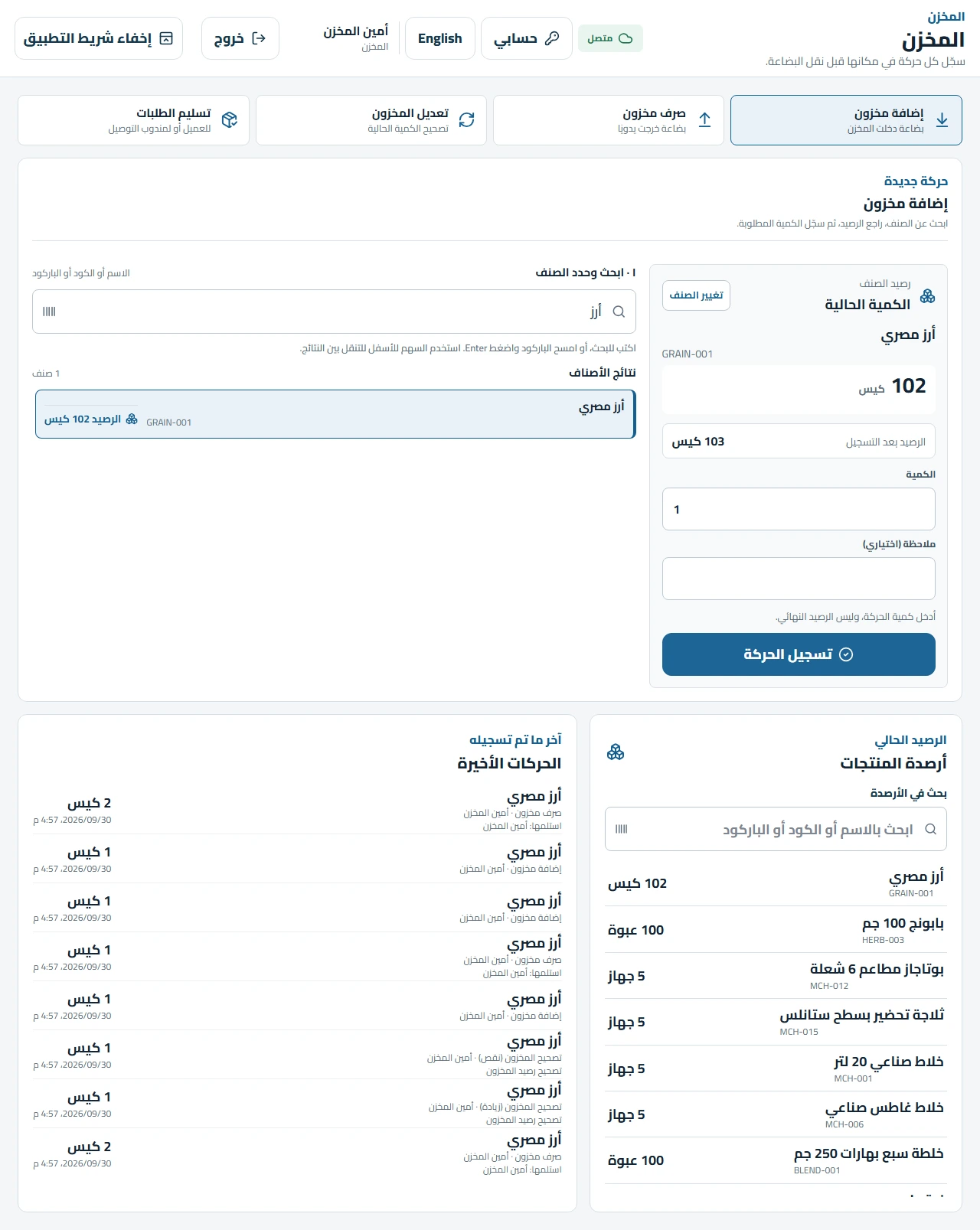
The operational interface uses large controls and visible primary actions. Arabic text, numeric values, product identifiers, and amounts must remain readable together. Search can accept names, item identifiers, and printed barcode values. Warehouse results expose the balance before the worker begins a movement.
The current product picker uses a separate category rail and a bounded product grid. Management can use denser views on a larger screen, while operational tasks retain an interaction structure suitable for touch. The manager touch and desktop modes share the underlying data and business actions.
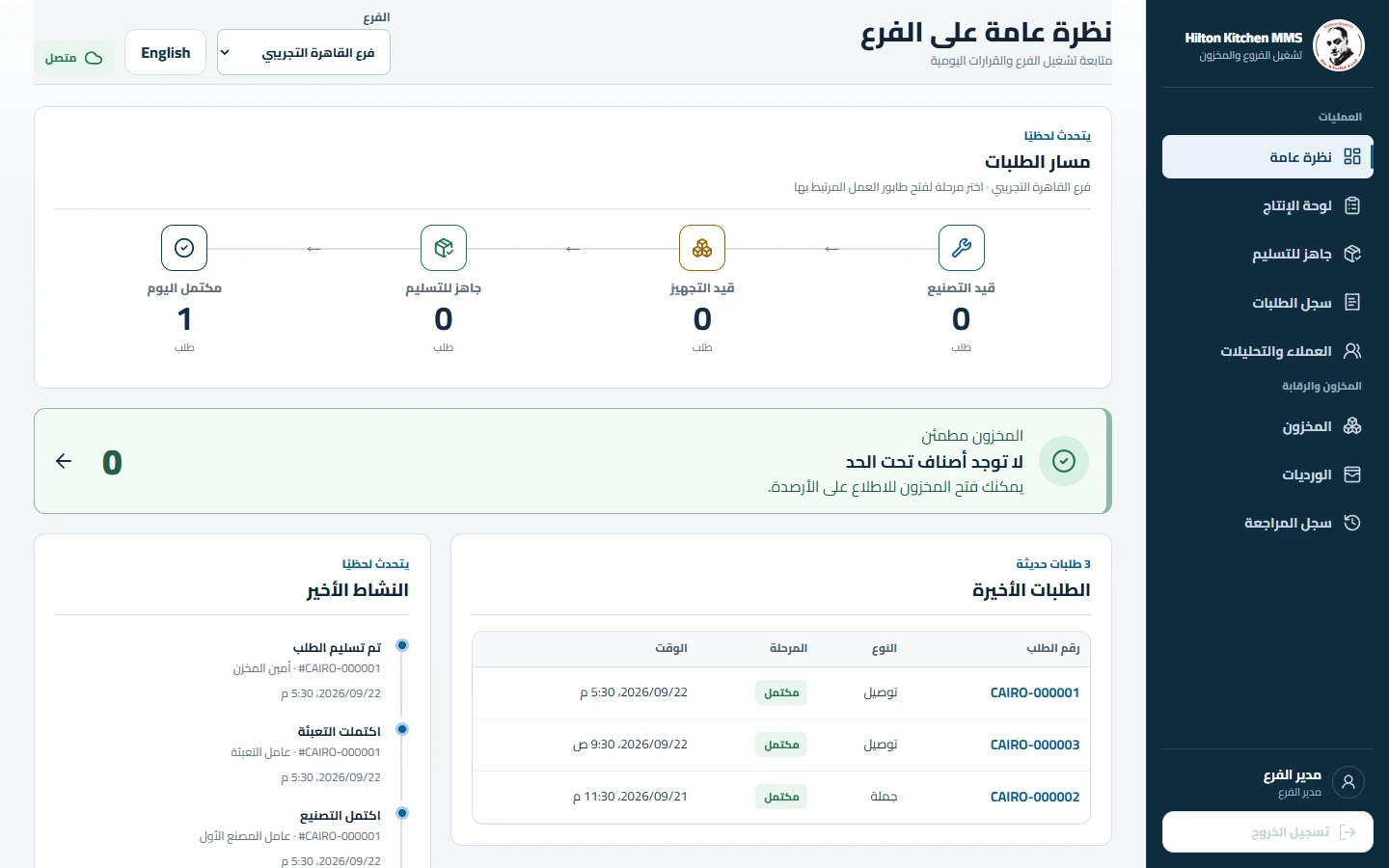
The desktop management view uses the extra width for operational overview. The gallery also includes the manager touch presentation.
Treating incomplete and failed work as designed states
An empty factory queue should explain that there is no current work. A product search with no matches should leave the next step obvious. A quantity validation error should remain near the input that needs attention. A pending network operation should not resemble a confirmed stock update.
The supplied images include these quieter states because they matter to daily use. The newest warehouse work also addressed keyboard selection, repeated-entry focus, confirmation of the committed balance, and phone-width header overlap found during visual checks.
Printing is another product interface
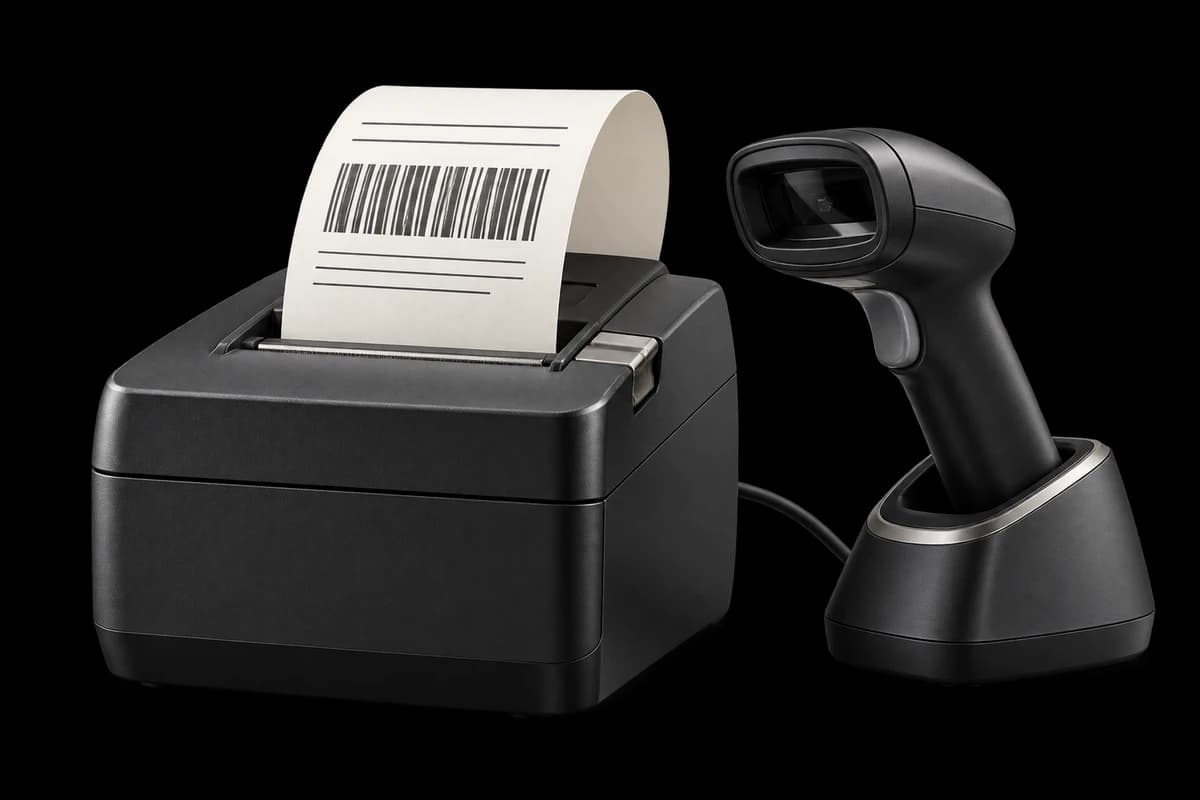
The application produces thermal POS receipts, A4 sales and machine invoices, product labels, packaging slips, and related operational documents. Each document serves a different task. A cashier receipt, a machine invoice, and a package slip cannot share one layout merely because they all contain an order number.
Screen presentation and print geometry are separated. The enterprise screen stylesheet can improve workspace spacing without changing physical document dimensions. Browser previews remain useful for review, while later printing adapters and local print-agent support extend the delivery options. Actual printer, scanner, and media calibration remain a separate acceptance activity.
Following the product through its commit history
| Date | Repository milestone | Engineering significance |
|---|---|---|
| 26 August 2026 | Polished POS checkout (2fd5c2f) | A focused product-selection and customer checkout foundation |
| 29 August 2026 | Direct POS completion (c98173e) | Finished-stock retail sales separated from production |
| 30 August 2026 | Machine sales and invoice pagination (d31f149) | Dedicated equipment path and predictable A4 continuation |
| 30 August 2026 | Physical machines and packaging reconciliation (1868850) | Unit identity and packaging become explicit domain concerns |
| 9 September 2026 | Offline operations and order lifecycle (918ab9a) | Broader employee offline work and lifecycle operations |
| 26 September 2026 | Workspace and desktop reliability update (cb42e3f) | Integrated interface and Windows refinements |
| 29 September 2026 | Collaborator changes (620511a) | Current committed baseline, including warehouse correction work |
| 29–30 September 2026 | Additional local fixes and verification | Desktop replay compatibility and the latest warehouse interaction refinements |
The history is a record of product changes, not a timesheet. It does not establish team size, total development effort, or the date every capability reached an installed terminal.
The details are the result.
Product scope, not performance claims. Application test counts below belong to their dated September checkpoints.
What the evidence establishes
The repository contains tests for business outcomes and failure paths: stock shortages, mutation replay, transition conflicts, invoice pagination, machine isolation, payment behavior, returns, and offline command handling. Component and browser checks cover the interfaces through which employees perform that work.
The dated September reports record backend, frontend, desktop, build, migration, and browser verification. The September 29 desktop report records 153 backend tests, 514 frontend tests, 208 desktop Vitest tests, and 32 packaging-policy tests. The separate September 30 warehouse handoff records 517 frontend tests and 153 backend tests, plus focused browser verification at phone, tablet, and desktop sizes.
These counts belong to different checkpoints. We do not combine them into one supposed test run, treat a test count as a business outcome, or describe historical checks as freshly executed for this case study. The documentation work on 18 October reused existing evidence and screenshots without starting the application.
The result we can responsibly describe
We built a connected implementation in which immediate sales, production orders, payments, returns, and inventory movements have explicit rules. Staff can work through role-specific interfaces while the system preserves a consistent operational history. Documents and live views follow those actions, and the Windows application provides a durable path for provisional offline work.
The value is visible in what the product can now represent: a machine sold but not fully paid, manufactured goods ready but not yet handed over, a returned serial with an explicit disposition, or an offline command waiting for a definitive result. These are concrete capabilities supported by the source.
No measured revenue increase, percentage reduction in errors, checkout-speed improvement, or customer satisfaction score was supplied. Those would require a separate business measurement exercise. This case study makes no invented ROI claim.
Delivery boundaries that remain visible
The latest warehouse source refinements have local verification evidence; their deployment is not established by the earlier release report. The Windows 0.1.5 artifact has build, packaging, and download evidence, while actual packaged runtime and physical hardware acceptance remain pending in the recorded handoff. The current screenshot archive contains light-mode Arabic screens; no dark-mode product capture is claimed.
These distinctions let the engineering record remain useful after the portfolio page is published. A clear product story should survive comparison with the repository and release evidence.
Frequently asked questions
Is Hilton Kitchen a general ERP?
The implementation is organized around the approved order, production, inventory, payment, and employee-operation workflows. Its depth comes from modeling those workflows carefully. This case study does not extend its claims to accounting, payroll, procurement, or unrelated ERP modules.
Does the browser work offline like the Windows application?
The Windows employee application supports durable provisional operational work and replay. Ordinary browser sessions cache the application shell and static assets; they do not originate offline business writes. These are distinct capabilities.
Do machine orders go through manufacturing?
No. They sell finished inventory and complete directly. Delivery and wholesale follow the manufacturing and packaging path. A machine balance due is financial work, not a manufacturing state.
Are InstaPay and Vodafone Cash processed by the application?
The system records supported payment methods, references, and evidence. This is payment recording and reconciliation, rather than a claim that the application operates an online payment gateway.
Can the case-study page support both Arabic and English?
Yes. This package includes three separate Markdown editions with shared evidence and local assets. The Egyptian professional and humorous editions are independently written for their readers. A publication brief describes language and tone navigation, RTL layout, and light/dark presentation of the case-study website itself.
Build around the operation your team actually runs
Hilton Kitchen demonstrates our approach at Softworks: understand what each operational action must mean, encode that meaning in the domain model, and give people an interface that makes the next step clear. The work extends from a transaction boundary to a decimal input, from a machine serial to the final invoice page.
If your team is connecting sales, production, warehouse work, and customer balances, that operating model is the right place to begin the conversation. Bring the workflow, the difficult exceptions, and the documents people depend on. We can shape the software around those realities.
Softworks Engineering Team
Inside the product
The working system. Screen by screen.
21 retained captures from August and September 2026: operations, warehouse, payments and print. All are Arabic/light; captions distinguish historical views and deliberate QA states.
Original product captures with seeded demo and QA records.
21 screensWebManager desktop overview
The desktop overview brings the order pipeline, stock attention and recent activity into one branch view. Demo branch and seeded records are visible.
 Web
WebCashier catalog and cart
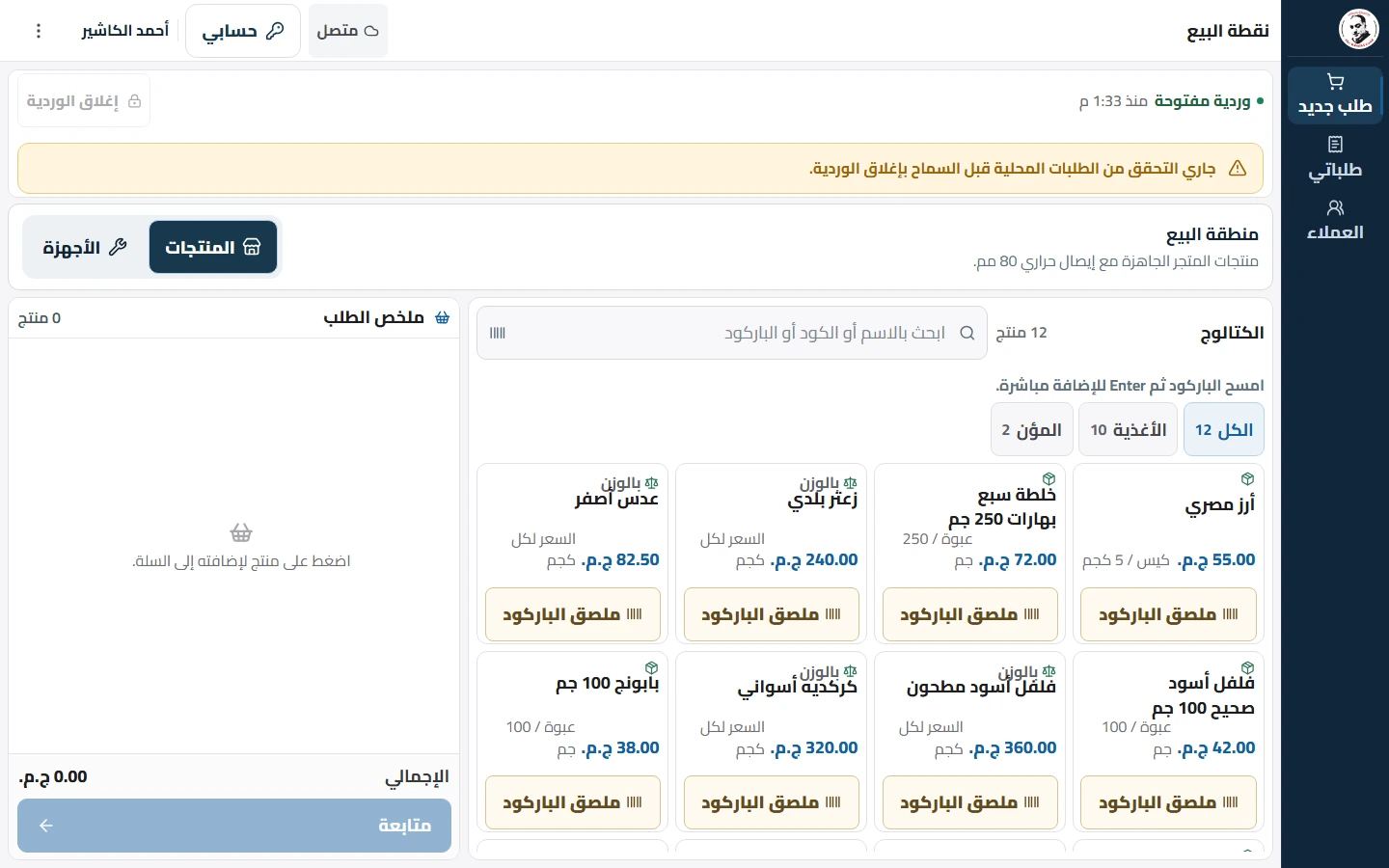
The cashier workspace separates the catalog from the order summary and exposes distinct standard-product and machine areas. A retained shift-check status banner is visible; this is a workspace capture, not completed-sale evidence.
WebWarehouse selection and balance
The latest retained warehouse redesign shows a selected product, current balance and the calculated balance after a stock-in movement. Local QA capture; this image does not establish production rollout.
WebSales workspace
The sales workspace combines order type, standard or machine selection, catalog search and a separate collection-session control.
 Web
WebMachine payment reconciliation
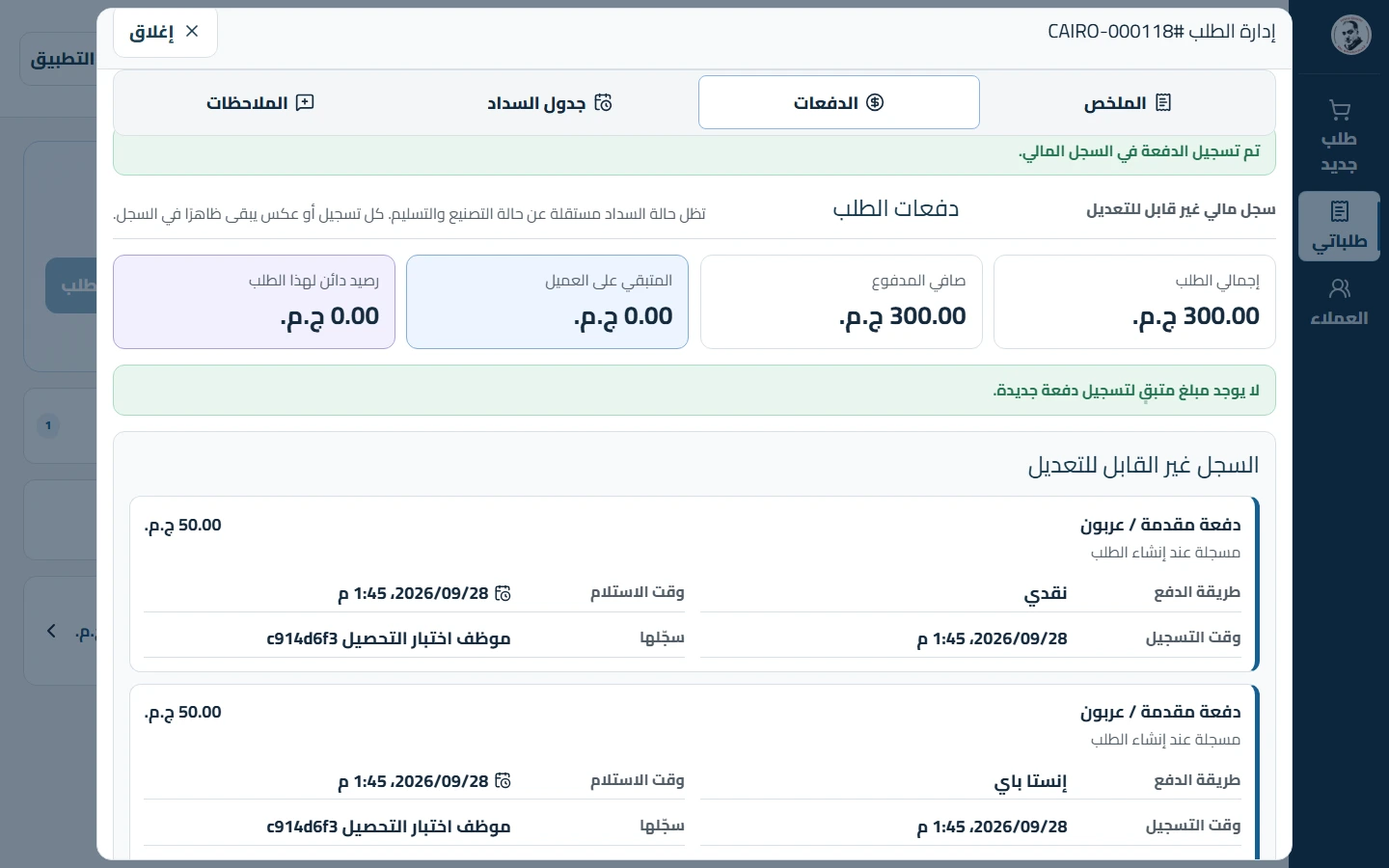
A retained end-to-end QA image shows a machine order fully paid after installment collection, with the recorded payment entries visible.
 Web
WebManager touch overview
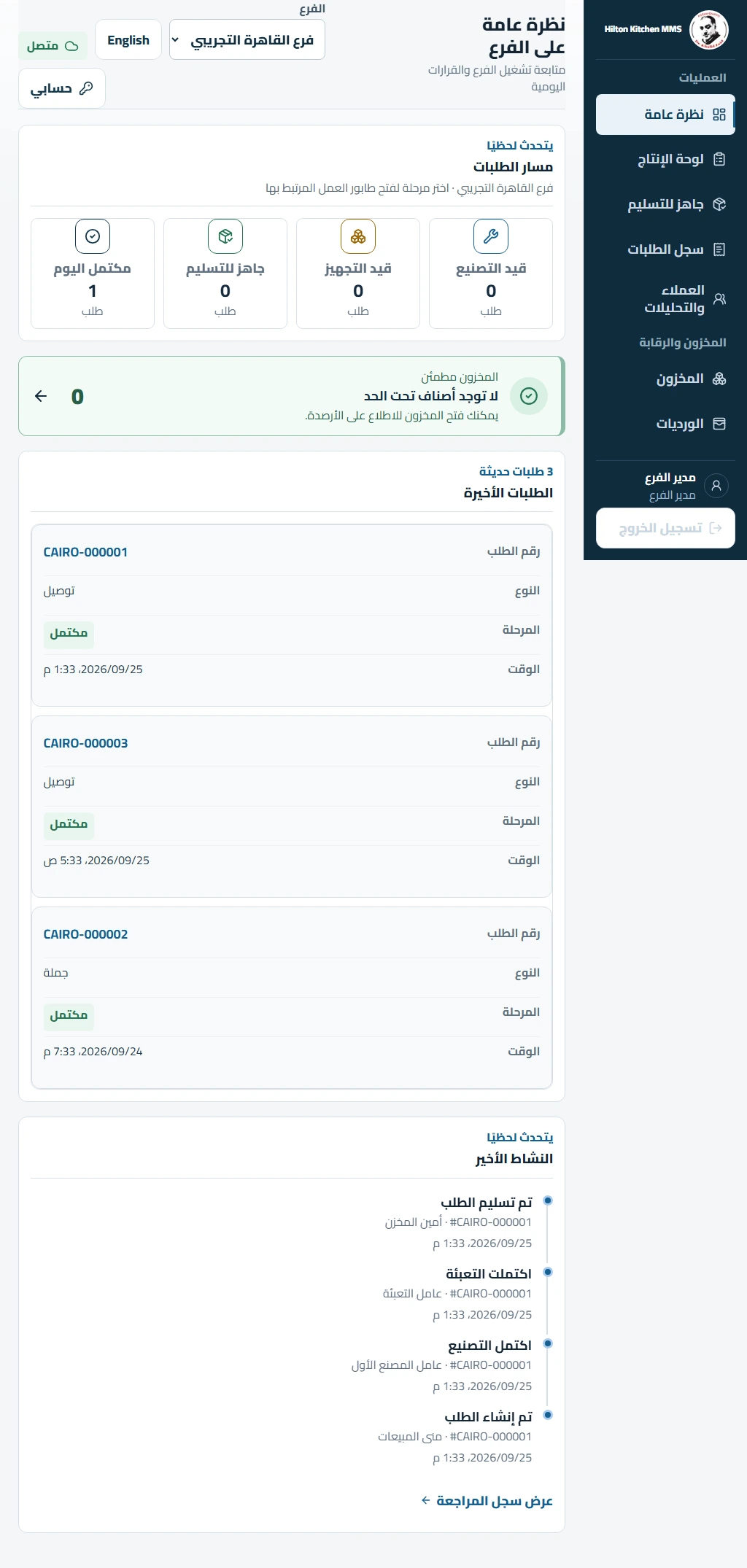
The smaller manager layout uses large cards for the same pipeline and recent-order information. The image is a full-page QA capture.