
 varqio
SOFTWORKS / THE COMMERCE ENGINEERING CASE STUDY
A store is onlythe beginning.
From the first product to the work behind every order. We built Varqio to bring storefront design, catalog, inventory and checkout into one connected commerce platform.

Demo screens · Concept hardware
CATALOG × INVENTORY- The product
- Varqio by Softworks
- Backing
- Undisclosed angel investor
- Market focus
- Egypt-first commerce
- Release
- Beta · Pilot qualification
THE IDEA IN ONE SENTENCE
Selling a product is one moment. Everything around it is the system.
01 / The platform
The storefront is the start.
An online store becomes a difficult software problem long before it becomes a large one. A merchant edits a product while a shopper is checking out. A payment result arrives twice. A promotion has one remaining use and several customers reach it together. A storefront looks correct in the editor, then wraps differently on a phone. None of these situations is unusual. Together, they define the work of building a commerce platform.
At Softworks, we built Varqio around those connections. The application brings catalog management, inventory, branded storefronts, checkout, orders, delivery and merchant operations into one product, with an Egypt-first context and room for different kinds of businesses. Its architecture joins a Next.js merchant dashboard, a Next.js storefront, a TypeScript API, MongoDB-backed domain services, object storage and background processing.
This case study explains the system that exists in the repository and the decisions behind it. The product is in controlled merchant-pilot qualification. The scenarios are reconstructed engineering examples grounded in code and tests, rather than accounts of undocumented customer incidents. No production revenue, adoption or performance uplift is claimed.
The brief: build a business workflow, not just a storefront
The visible brief was straightforward: help a merchant create a branded online store and run it. The engineering brief was broader. The product needed to keep the merchant's view of products, stock, orders and design connected to what a shopper could actually buy.
A catalog item carries more than a title and price. It may have variants, stock at different locations, physical delivery requirements, downloadable content, category relationships, custom attributes and a publication state. A storefront needs to express that information without forcing every merchant into the same layout. An order must preserve what was purchased even when the catalog changes later.
We therefore treated Varqio as a set of connected product journeys: establish a store, prepare a catalog, design the storefront, review the purchase flow, process an order, manage fulfillment and understand the operational result. This gave the interface a practical center. Pages exist to support a task, while shared services preserve the meaning of that task across the application.
The Egypt-first focus influenced those journeys directly. Egyptian-pound pricing, cash-on-delivery operations, local delivery geography, payment connectors and Arabic-friendly layouts are product requirements. They are not decorative additions to a generic international demo. At the same time, the architecture avoids embedding every provider's behavior inside the storefront component tree.
What the Softworks team built
Our work spans the product interface and the domain services underneath it. The merchant dashboard includes catalog, inventory, orders, promotions, fulfillment, analytics, content, theme editing and additional operational workspaces. The public storefront includes product discovery, collections, cart, checkout and customer experiences. Shared theme contracts connect the editor to the storefront runtime.
| Product area | What is customized | Engineering consequence |
|---|---|---|
| Merchant operations | Task-specific workspaces, navigation, store context and appearance | A product list, fulfillment queue and design canvas require different interaction models |
| Product catalog | Physical/digital products, variants, collections, categories and typed custom fields | Product data must remain usable across administration, storefront and checkout |
| Storefront identity | Brand tokens, templates, sections, blocks, navigation and content | Design choices become a structured document that can be saved and versioned |
| Commerce | Prices, promotions, order records, stock and fulfillment decisions | Changes need explicit state transitions and recoverable work |
| Regional workflows | EGP, Arabic/RTL, local geography, COD and provider connectors | Localization reaches data and operations as well as visible copy |
| Assisted editing | Contextual conversation, proposals, streaming and usage accounting | Suggested changes must fit the same product model as manual edits |
| Developer extension | Headless interfaces, theme packages, CLI and MCP integration | External tools need a supported contract rather than a parallel product implementation |
These areas are not all equivalent release claims. Some are mature local workflows; some are staged implementations; provider-backed operation requires its own acceptance. That distinction is part of the engineering story.
02 / The system
One model. Different jobs.
A shared domain model with distinct product surfaces
We separated the merchant and shopper applications because they have different jobs. A merchant workspace favors dense information, editing, selection and operational history. A storefront favors discovery, readable content, product detail and a short purchase path. Sharing every visual component would blur those priorities; duplicating commerce rules would create a different problem.
The architecture shares the parts that must agree: theme documents, component definitions, layout rules, catalog meaning and API behavior. The dashboard and storefront retain their own rendering and interaction responsibilities. A backend-for-frontend layer connects each application to the domain API, while durable operations continue in workers where the workflow requires it.
This is a modular platform, not a claim that every domain is a separately deployed microservice. The important boundary is ownership of behavior. Catalog services define product meaning. Theme services manage drafts and versions. Commerce services manage order and payment transitions. Workers carry work that must survive beyond one browser request.
The repository also preserves compatibility code. We did not describe the modernization as a clean-sheet rewrite because it was not one. The architecture has an active domain API and a legacy compatibility surface, allowing product areas to advance without pretending the previous system never existed.
Many surfaces. One source of meaning.
Select a component to inspect its role and connections.
 Node.js
 Express
 TypeScript
The TypeScript API owns catalog meaning and business state transitions. Interface code does not independently redefine commerce rules.
Read every system connection
- Theme contracts Merchant dashboard
- Theme contracts Public storefront
- Merchant dashboard Commerce API
- Public storefront Commerce API
- Commerce API Durable records
- Commerce API Media & assets
- Commerce API Workers & providers
- CLI / MCP / Custom clients → Commerce API
- Workers & providers → Configured commerce providers
View architecture source
flowchart LR
  M[Merchant] --> D[Next.js dashboard]
  S[Shopper] --> F[Next.js storefront]
  D --> A[TypeScript commerce API]
  F --> A
  C[Shared theme contracts] --> D
  C --> F
  A --> DB[(MongoDB)]
  A --> O[Object storage]
  A --> W[Background workflows]
  W --> P[Configured commerce providers]
  X[CLI / MCP / custom clients] --> A
The technology stack and why it fits
The two web applications declare Next.js 15.5.27 and React 18.3.1. TypeScript supports shared contracts across the interfaces and services. Tailwind CSS and Radix-based primitives support the dashboard's visual system, while dnd-kit provides the structural interaction model for the storefront editor.
The API uses Express with MongoDB and Mongoose. The data model suits a platform combining structured commerce records with versioned theme documents and varied product configurations. The important choice is not simply “document database”; it is deciding which records are mutable, which represent a historical snapshot, and which operations require coordination.
LiquidJS supports uploaded theme packages alongside the native theme system. Sharp and S3-compatible tooling support media workflows. The AI implementation uses an AI SDK and provider adapters. The MCP integration has its own package. Deployment support includes OpenNext/Cloudflare configuration and API/worker deployment tooling; this case study does not claim that the current working tree is the exact revision running on a public host.
| Layer | Main tools | Role in Varqio |
|---|---|---|
| Merchant and shopper web | Next.js, React, TypeScript | Separate application experiences over shared commerce meaning |
| UI and interaction | Tailwind CSS, Radix primitives, dnd-kit | Workspace controls, dialogs and pointer/touch/keyboard editing |
| Domain API | Express, TypeScript, Mongoose | Explicit catalog, theme, commerce and operational services |
| Persistence | MongoDB | Product records, order state, theme versions and durable jobs |
| Media | S3-compatible storage, Sharp | Asset storage and image processing |
| Custom themes | LiquidJS | A supported package-based rendering route |
| Assisted workflows | AI SDK, provider adapters | Streaming assistance and structured change proposals |
| Verification | Jest, Supertest, temporary MongoDB, Playwright, Node contracts | Domain behavior, concurrent execution and real browser journeys |
| Local environment | Docker Compose, MongoDB, MinIO | Reproducible development and screenshot data |
Dependencies in a package manifest do not prove that every associated service runs in every environment. We describe the tools that support the implementation, and keep environment-specific activation explicit.
CHOSEN FOR THE WORK
Every tool has a job.
From the interaction on screen to the work behind it.
The experience layer
Two web applications. One typed product vocabulary.
 Next.js
 ReactTypeScript
 Tailwind CSS
 Radix UI
dnd-kit powers structured editing.
The commerce layer
Domain services, explicit transitions and persistent records.
Node.jsExpress MongoDB
 Mongoose
Catalog · Orders · Payments · Inventory
Media & theme rendering
Stored assets and a supported custom-theme runtime.
 Sharp
SharpS3-compatible storage · LiquidJS
Delivery & verification
Reproducible local environments, tests and deployment tooling.
 Docker
 Jest
Jest Cloudflare
Supertest · Playwright · OpenNext support
Technologies documented in the source. Deployment support is distinct from environment acceptance.
03 / The builder
What you preview is what you publish.
The hardest visual problem: making preview mean preview
Imagine a merchant adjusting a product hero on a laptop. The editor shows a clean composition. After publication, the storefront displays a different crop, spacing or block order. Even if the checkout works, the design tool has broken its central promise.
We addressed this by making the editor preview use the actual storefront runtime. The dashboard manages the theme document and editing controls; the canvas embeds a storefront preview of a specific snapshot. The same storefront modules serve the published experience. Selection and inline editing are added around that runtime rather than creating a second approximation of the page.
The shared component registry defines supported sections and blocks. Settings metadata describes the controls merchants can use. The API understands the same document concepts, and runtime handlers render them. This creates a useful chain: a component has a definition, an editing surface, a saved representation and a rendering behavior.
The cost is coordination. A new section cannot be considered complete merely because a dropdown lists its name. Its fields, defaults, nesting rules, runtime rendering and saved-document behavior need to agree. We chose that discipline because it makes preview/live consistency an engineering property that can be tested.
Reconstructed scenario: the mobile hero
A merchant sets generous desktop spacing, then opens a narrow preview. The headline needs a tighter measure and the section needs less padding. A single global value would force a compromise between desktop and mobile. Varqio's responsive settings provide device-specific overrides with inheritance, allowing the merchant to tune the smaller layout while preserving the desktop composition.
The resulting document remains one theme. It does not become three unrelated pages that must be maintained separately. The implementation includes responsive settings and runtime contracts; comprehensive acceptance still requires representative content and viewport checks.

Turning a page builder into an editing system
Drag-and-drop is only the visible part of a builder. A merchant also needs to select the correct block, move it without losing context, undo a mistake, recover a saved design, understand autosave, and distinguish a draft from what shoppers currently see.
Varqio uses dnd-kit for pointer, touch and keyboard interactions. Section insertion, reordering and nested block movement operate on a structured theme document. The history model treats structural operations as commands and can group nearby scalar edits, so undo feels related to the user's action rather than a stream of individual keystrokes.
Autosave introduces a subtler challenge. A save request may begin, and the user may continue editing before the response returns. Applying the older response unconditionally would erase the newer work. The current history code acknowledges saved normalization only when the present draft still matches the submitted one. Otherwise, the ongoing edit remains authoritative in the interface.
Reconstructed scenario: save finishes after the next edit
The merchant changes a headline, the application submits it, and the merchant immediately adjusts the next sentence. The first response returns. The correct result is to retain the second edit and continue saving, not to replace the document with the earlier headline-only snapshot. This is a small timing problem with a large effect on how dependable the editor feels.
We also separated publication from editing. Theme projects hold the working draft; immutable versions preserve published snapshots. Savepoints and restore actions support recovery. Returning an older design to a draft is different from changing the live version, and the product needs to communicate that difference.
The current implementation includes both draft history and publication controls. It does not imply collaborative real-time editing or unlimited branching, neither of which should be inferred from a familiar editor interface.
Walk through the difficult moment.
The response is old. The work is new.
- 01Draft A is submitted
- 02The merchant creates Draft B
- 03A returns. B stays.
The editor sends the current document for saving.
An illustrative TypeScript example: keep the newer edit
// Illustrative model — not copied production code.
function acknowledgeSave<T>(
  current: T,
  submittedRevision: number,
  currentRevision: number,
  normalized: T,
): T {
  // A late response must not erase a newer edit.
  return currentRevision === submittedRevision
    ? normalized
    : current;
}
Customization that remains understandable as a store grows
Commerce customization often starts as a color picker and becomes a document system. Varqio supports design tokens, templates, sections, nested blocks, responsive settings, navigation and reusable groups. Product templates and content pages can express different needs while remaining part of the same store identity.
Synchronized groups address repeated content. A merchant may want a consistent reassurance strip or a brand section across several templates. Copying it manually creates independent versions that drift. A synchronized group gives the repeated composition a defined relationship, with propagation and detachment handled deliberately.
The system also preserves a practical escape hatch: a merchant can detach an instance when it needs to differ. This matters because reuse and uniformity are not the same requirement. A product campaign may begin from a shared composition but need its own copy or arrangement.
We bounded the feature rather than presenting it as an unrestricted page-programming environment. Structural roots, commerce components and supported extension points carry their own rules. Native sections, curated app surfaces and uploaded theme packages are related capabilities, not interchangeable promises of arbitrary third-party execution.
| Customization layer | Typical merchant decision | System representation |
|---|---|---|
| Identity | Colors, typography, visual tone | Theme settings and tokens |
| Structure | Section order and template composition | Versioned section/block document |
| Content | Headings, copy, media and references | Typed settings and catalog bindings |
| Responsive behavior | Visibility, width and spacing | Device overrides with inherited defaults |
| Reuse | Shared composition or detached variation | Synchronized group and instance relationship |
| Release | Keep editing, publish or restore | Draft state and immutable versions |
ONE STOREFRONT RUNTIME
04 / The catalog
More than a name and a price.
A catalog that can carry more than one business model
We built catalog workflows around physical and digital products. A physical product may require variant stock, shipping weight and fulfillment allocation. A digital product may require a delivery mode and a customer library. Both need pricing, merchandising, publication state and understandable administration.
The catalog also includes collections, categories, custom fields, media and bulk operations. Typed metafields allow product-specific information to be represented without adding a bespoke database field for every merchant idea. The distinction between an arbitrary note and a typed field matters when that information later feeds storefront presentation or filtering.
Bulk work introduces another scale of interaction. Importing products or exporting a catalog should not depend on a single browser request remaining open indefinitely. The implementation includes import/export jobs and operational status, making progress and failure part of the workflow.
Reconstructed scenario: the catalog changes after checkout
A shopper buys an item at a stated price. Later, the merchant changes the product title, price or available variants. The order must continue to describe the purchase as it happened. Commerce snapshots keep historical meaning separate from the mutable catalog. Otherwise, reporting and support would be trying to reconstruct yesterday's transaction from today's product page.
This principle recurs throughout the platform: editing a current entity and recording a business event are different operations. The interface may bring them close together, but the data model must preserve the distinction.
Same catalog. Two real appearances.
05 / The transaction
Every sale has a state of its own.
Commerce is a sequence of states, not one successful button click
Checkout connects a cart, product availability, delivery choices, discounts, money and payment outcomes. A browser can disappear during any of those steps. A provider can respond late. A worker can restart. Designing only the immediate success response would leave the difficult states undefined.
Varqio represents the progression with explicit records and transitions: checkout sessions, payment attempts, provider events, order state, inventory work and fulfillment work. Money values carry an integer minor-unit amount and a currency, so financial meaning is not left to display formatting.
Provider events can be queued and processed independently of the shopper's browser. Work has a recoverable lifecycle, and repeated events need to be recognized as repeated work rather than new business. The implementation contains recovery and reconciliation services for these situations. It does not turn an unknown provider outcome into a confident success message.
Reconstructed scenario: the payment result arrives twice
The payment provider sends a result. The application processes it, but the provider does not receive the acknowledgement and sends it again. A correct commerce system must keep one business outcome. It should not create another order or repeat downstream work simply because the transport repeated a message.
The September 10 commit introducing Kashier payments and billing shows this work crossing several domains: connector behavior, payment orchestration, billing lifecycle, provider events and the dashboard. We present it as a cross-cutting integration, rather than suggesting that a checkout logo completed the work.
Real provider qualification is a separate milestone. Local tests and synthetic event journeys demonstrate implementation behavior under their test conditions. They do not prove every live payment, refund, timeout or reconciliation path with a configured provider.
One promotion, several shoppers: a concrete concurrency problem
One of the most instructive issues in the current engineering evidence involved a promotion limited to one use. Several checkouts could compete for the remaining capacity. A design that reads availability and later allocates a slot can make a decision from two different moments in time.
The recorded regression reproduced an over-allocation under concurrent execution. The correction tied the candidate allocation to the actual capacity boundary and retained bounded conflict handling, replay behavior and released-capacity reuse. The important lesson is broader than coupons: a valid individual write does not automatically prove that a business-wide limit was respected.
Reconstructed scenario: the last discount
Twelve different checkout attempts compete for a single remaining use. Only the permitted capacity should be allocated. A retry of the same checkout should recover its existing result. A released reservation should be reusable according to the rules. Reducing the limit should not make an older out-of-range slot eligible again.
That is a much stronger specification than “the discount applies.” It describes the simultaneous, repeated and changing-state cases that make a promotion dependable. The scenario is based on a temporary MongoDB regression documented in October; it is not presented as a customer-facing production incident or attributed to a September commit.
Inventory and delivery keep their own operational meaning
Inventory is not a single stock number. On-hand quantity, reserved quantity, available stock and fulfillment allocation answer different questions. A merchant can hold stock in more than one location, and an order may need work before it can be fulfilled.
Varqio's implementation includes inventory locations, holds, adjustments, allocation-related services, rebalancing and paid-order inventory handling. Fulfillment services translate the commercial order into operational work. This separation makes it possible to describe what remains to be done without altering the historical purchase itself.
For Egypt-first delivery, geography and payment method are part of the workflow. A delivery policy can depend on the relevant local area and available options. Cash on delivery needs an operational interpretation beyond a checkout label. Shipping connectors must map platform concepts to provider-specific requirements.
Reconstructed scenario: an order spans operational steps
A shopper completes checkout, but one item requires allocation and the shipment has not yet been created. Treating “paid” as synonymous with “shipped” would hide the remaining work. Separate states let the merchant see the commercial outcome and the fulfillment task independently.
We describe the implemented orchestration and local behavior without claiming that every external carrier flow is certified. The distinction lets the case study explain the engineering depth while preserving an accurate release picture.
03 / WORDS THAT CHANGE THE WORK
Every state means something.
- 01On hand
- Physical units held at a location.
- 02Reserved
- Stock held for an existing commitment.
- 03Available
- Stock that can still be offered.
- 04Fulfillment
- The remaining work to prepare and deliver.
06 / The experience
Built around the person doing the work.
Varq AI as part of the product workflow
An assistant becomes more useful when it understands the object being edited. Varq AI's working-tree implementation includes conversation history, streaming responses, contextual tools, structured proposals and usage accounting. In the storefront workflow, suggested edits are expressed through the existing theme model.
This is a product decision as much as an integration decision. A suggestion should identify what would change and let the merchant review it. Manual editing and assisted editing should converge on the same document and services, so the assistant does not become a second implementation of the builder.
Usage accounting introduces its own lifecycle. A request can reserve an allowance before execution and settle afterward. An interrupted request may leave an uncertain outcome that requires reconciliation. The user experience must acknowledge that uncertainty rather than treating every interrupted stream as free or every started request as fully completed.
Reconstructed scenario: an edit arrives after the document changes
The assistant proposes a change to a section. Before applying it, the merchant edits that section manually. The proposal must be evaluated against the current revision rather than blindly replacing the newer content. This is the same underlying product principle as autosave: a delayed result must not erase a more recent decision.
The implementation supports this direction, but real provider quality, latency, usage receipts and broader activation remain qualification work. We do not present fixture responses as live model output or quote unmeasured AI productivity gains.
Designing for English, Arabic and real working conditions
Arabic support reaches beyond translating menu labels. Long product names, mixed Arabic and Latin text, currency formatting, directional layout, dialogs and mobile navigation all affect whether the interface remains usable. The merchant should not have to understand the component framework to understand an order status.
We use task-specific layouts rather than repeating one dashboard pattern. Catalog work benefits from filtering and selection. Order work benefits from state and detail. Design work needs a canvas, layers and controls. Analytics needs clear definitions and an honest distinction between zero data and a failed request.
Appearance is also contextual. The dashboard includes light and dark modes. Storefront design tokens belong to the merchant's brand and are separate from the dashboard preference. The editor has its own studio styling, so each screenshot records the appearance actually observed rather than implying that every surface has an interchangeable dark version.
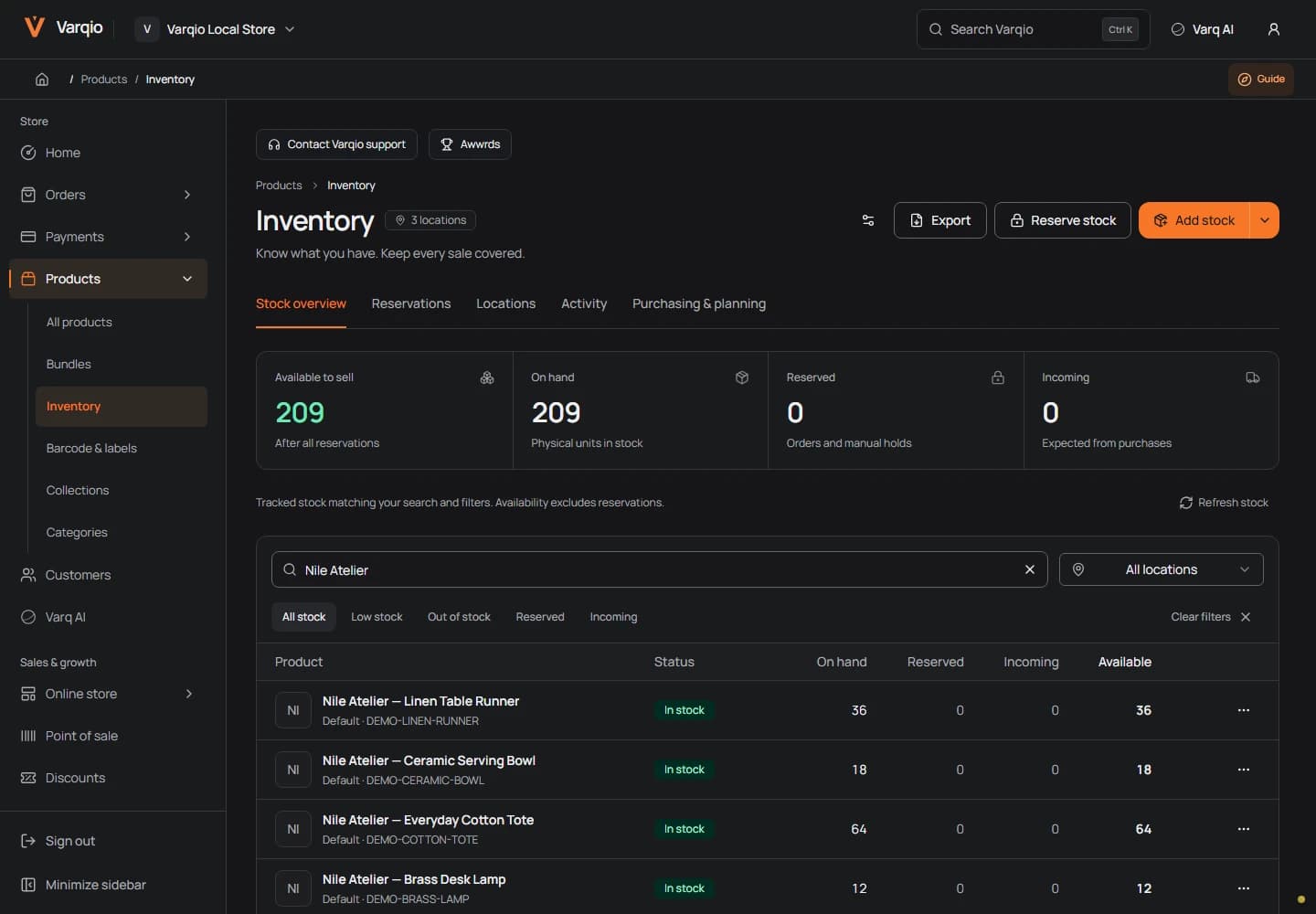
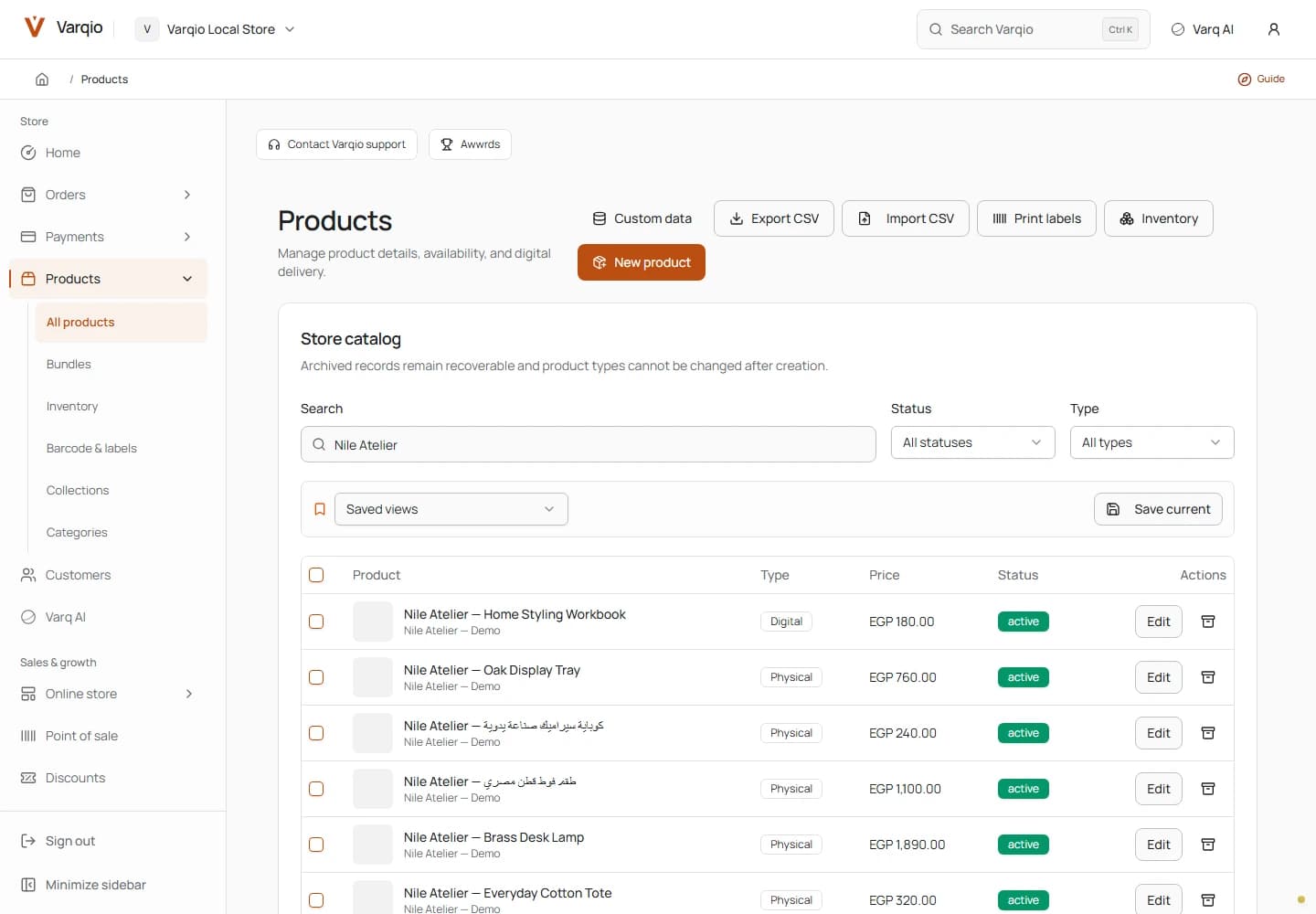
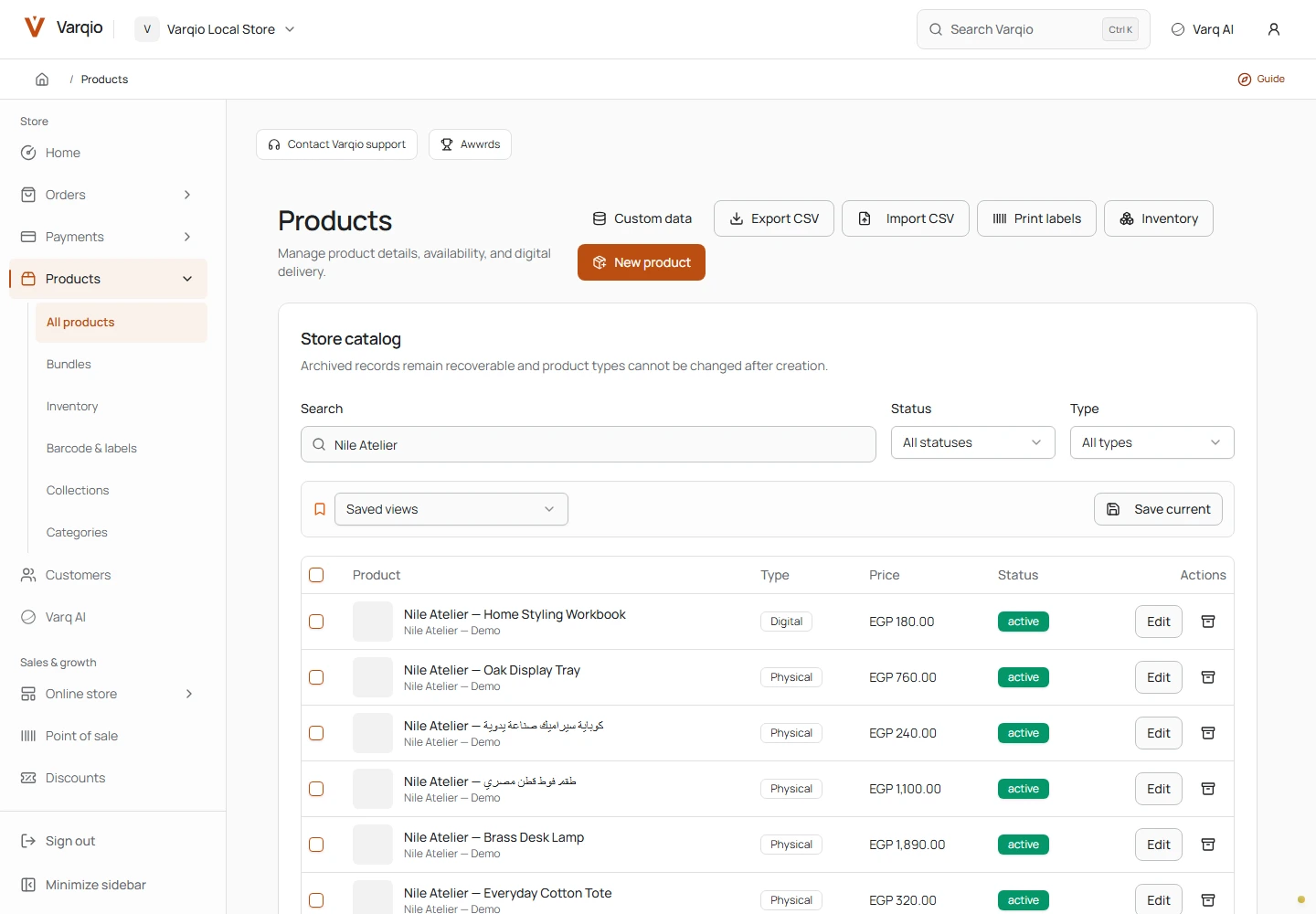
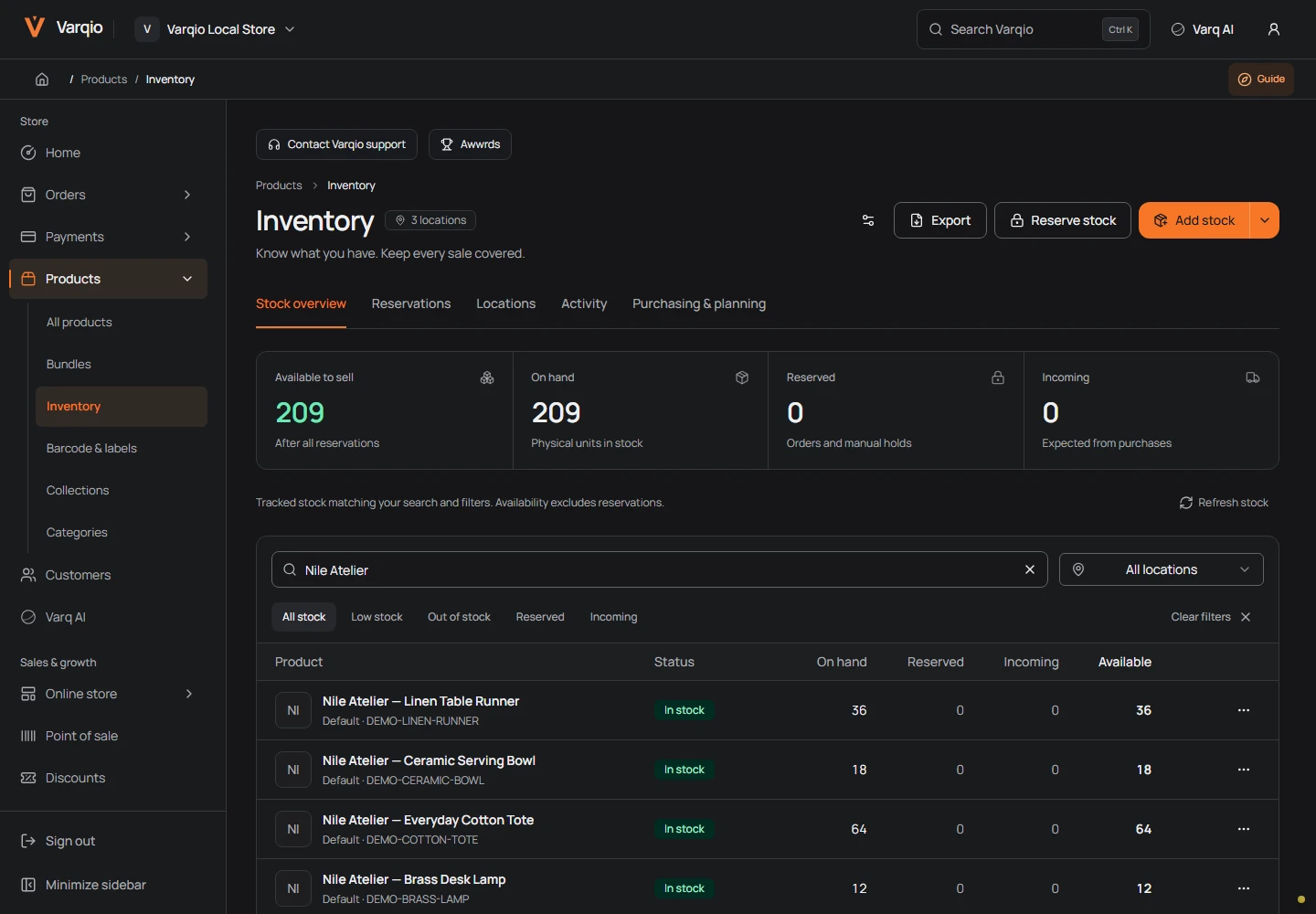
Screenshots accompanying this article come from a local demonstration with synthetic data. Their captions identify the screen, theme and viewport. They are evidence of the shown interface, not evidence of real customer activity or commercial traction.
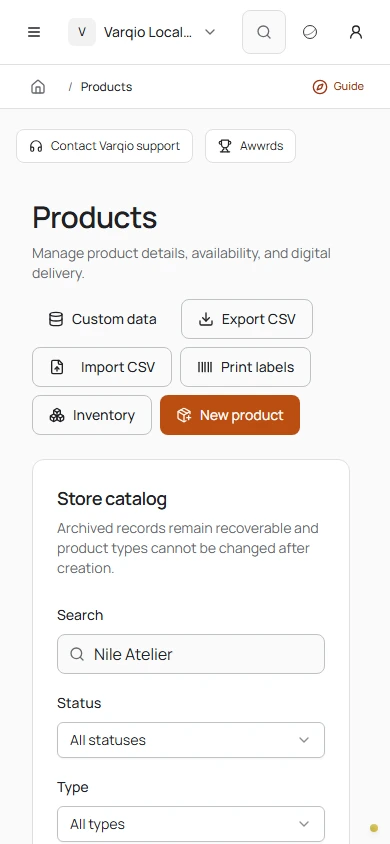
Local context. Room to work.
Arabic and English, EGP pricing, and a catalog that adapts to a smaller screen. Regional detail shapes the everyday workflow.
Catalog / Mobile · Actual interface, fictional demo data
07 / The beta
A real product. An honest next step.
What the commit history tells us
The available history gives the project a concrete sequence without requiring an invented delivery narrative.
| Date | Recorded milestone | What it tells us |
|---|---|---|
| 17–18 August 2026 | Sanitized baseline and local development baseline | The platform was recovered into a repeatable repository foundation |
| 8 September 2026 | Monorepo consolidation | The application surfaces were brought into one coordinated codebase |
| 10 September 2026 | Kashier payments and billing | Payment integration reached orchestration, billing, events and UI |
| 15 September 2026 | OpenNext tracing correction | Deployment packaging needed to respect the per-application package roots |
| 16 September 2026 | Monetization, domain and worker work | Commercial configuration and operational lifecycle continued alongside the product |
| Later working-tree work | Shared-runtime builder, responsive composition, groups and Varq AI | These features exist beyond the latest commit and must be described as such |
The OpenNext correction is a useful example of engineering that is rarely visible in a portfolio screenshot. An application can work in development and still have packaging problems when a build tool traces files from the wrong root. The commit adjusted application configuration and related deployment documentation. We do not extrapolate that change into a claim that every deployment path is certified.
The domain work tells a similar story: a connected hostname, its readiness state and its commercial eligibility are different concerns. The related commits include behavior and test corrections. The lesson is to model the workflow explicitly rather than reducing it to a single “connected” badge.
Verification follows the claim
We use different kinds of evidence for different kinds of questions. Type checking and builds establish that code compiles. Unit and integration tests exercise domain behavior. Temporary MongoDB tests can reproduce concurrency. Browser journeys examine the actual interaction and rendering path. Provider qualification examines the real integration under an approved test environment.
For the builder, the key question is whether a saved composition behaves consistently in the editor preview and storefront. For promotions, it is whether competing checkouts respect capacity. For payment recovery, it is whether repeated or interrupted processing converges on the correct business result. For a screenshot, it is whether the visible screen is a real application state with a disclosed demo context.
Historical reports contain substantial local verification, but this article does not add their totals together or call them a current full-suite pass. A route count is not a count of accepted workflows. A successful build is not a provider receipt. A rendered page does not prove every loading, failure and empty state.
That evidence discipline shapes how we describe the outcome. The platform contains a substantial commerce implementation and a connected visual editing system. Broader route acceptance, real provider journeys and current-candidate release qualification remain explicit next steps.
The outcome: a connected commerce platform with a clear next gate
Varqio demonstrates the Softworks team's ability to connect product design with domain engineering. The visible result is a merchant application and branded storefront system. The deeper result is a set of consistent relationships: catalog to checkout, draft to publication, payment event to order, inventory to fulfillment, and assisted editing to the same document model used by a person.
We customized the product where merchants experience the difference: how they organize products, compose pages, review changes, manage operational work and move between English and Arabic. We also invested in work that is less visible but essential to the experience: delayed responses, repeat events, version conflicts, recovery and deployment packaging.
The next milestone is a qualified controlled pilot backed by the remaining acceptance evidence. There is no invented conversion lift or headline revenue figure to substitute for that work. The case study's value lies in the implemented system, the decisions that connect it and the clarity about what the evidence establishes.
Building a commerce product with similar complexity? Softworks can help define the workflows, design the interface and engineer the services that make the experience coherent. Start with the business journey that must work, then make its data, states and interactions agree.
Technical questions
Is Varqio a website builder or a commerce platform?
It is a commerce platform with a storefront builder. Catalog, checkout, orders and operational services provide the business behavior; themes express the merchant's storefront identity.
What prevents preview and publication from becoming separate products?
The editor embeds the actual storefront preview runtime, and shared contracts describe the theme components and settings. Publication uses versioned snapshots rather than an unrelated editor-only rendering model.
Can different stores have different layouts?
The native theme system supports templates, sections, nested blocks, design settings and responsive behavior. Custom theme packages provide an additional supported route. The available capability still depends on the implemented feature and its enablement.
Does the case study claim the application is fully launched?
No. It describes the current implementation and local demonstration while identifying controlled-pilot qualification as the product stage.
Are the scenarios real production incidents?
They are reconstructed examples based on code, tests and documented regressions. The promotion concurrency example is tied to a recorded local regression; the other examples explain implemented workflow decisions without inventing customer incidents.
What does the technical story focus on?
The technical narrative focuses on product architecture, data behavior, customization, interaction design and reliability, with concrete examples that connect implementation choices to merchant and shopper workflows.
08 / INSIDE THE PRODUCT
The real thing, up close.
Catalog and inventory, across desktop and mobile. Open the captures and inspect the details.
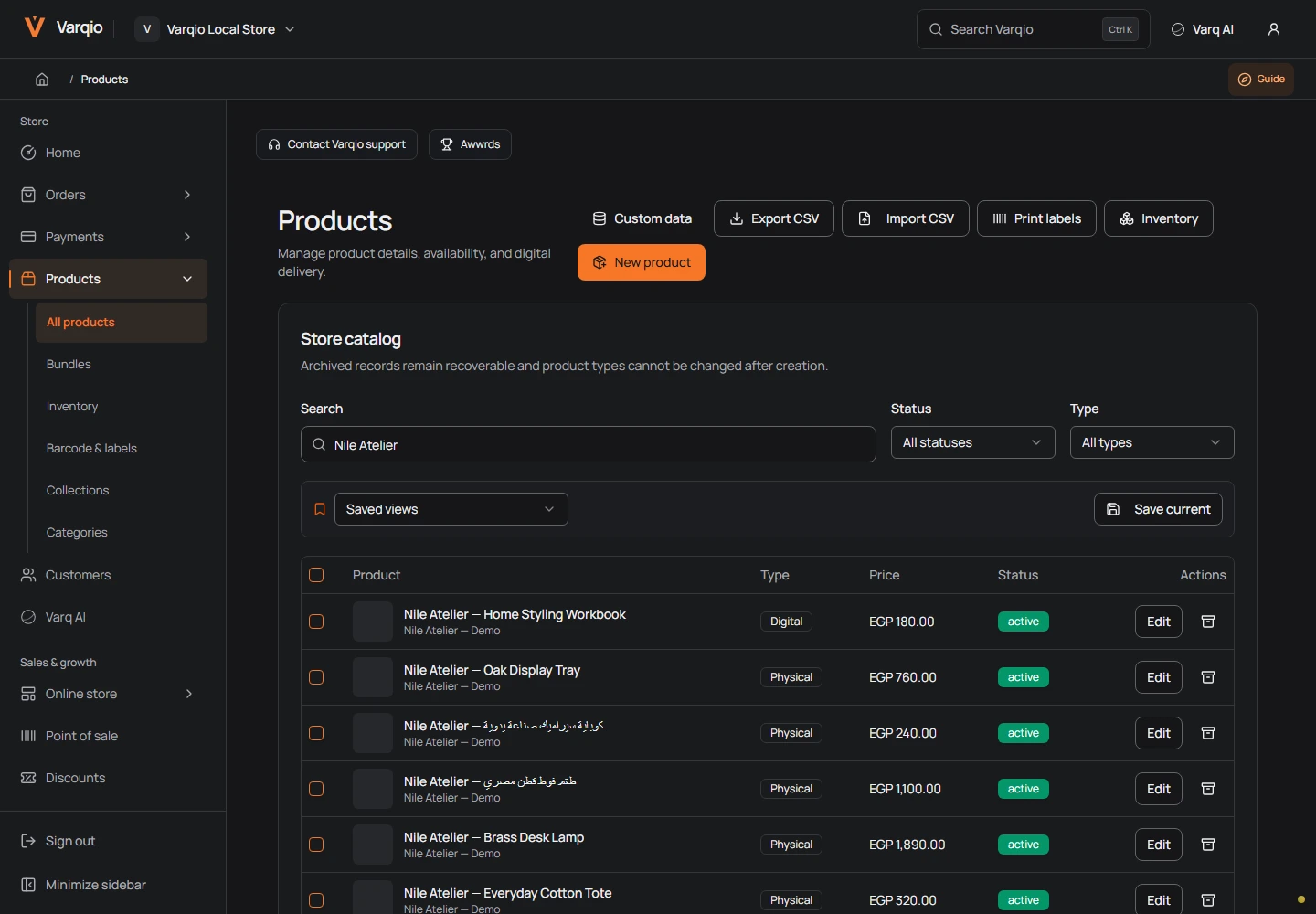
Four actual local captures, with fictional data. Open a screen to inspect it. Product artwork is intentionally absent in the supplied fixture.
4 screensWebCatalog / Light
Merchant catalog in light appearance. Actual local interface, fictional Nile Atelier data. Captured after the theme transition settles.
 Web
WebCatalog / Dark
Merchant catalog with bilingual synthetic products. Actual local interface, fictional Nile Atelier data. Filtered to the eight Nile Atelier demo products. Product artwork intentionally absent.
WebInventory / Dark
Inventory workspace. Actual local interface, fictional Nile Atelier data. Filtered to Nile Atelier synthetic products; no production data.
PhoneCatalog / Mobile
Catalog at phone width. Actual local interface, fictional Nile Atelier data. Phone viewport, controls wrap to fit; no image retouching.